CygNet Swinging Door Compression
The CygNet Swinging Door (CSD) compression method significantly reduces the number of historical real-time values stored in the CygNet Historian (VHS). When CSD compression is configured to be performed for a CygNet point, a new value will be reported to the VHS when the slope of the line calculated between the last value reported to the VHS and the new value falls outside the slope deviation range.
Considerations for Maximum reporting interval and Minimum evaluation time will be evaluated before applying the compression settings. For example, if a new value is received by the CVS that exceeds the configured Maximum reporting interval, it will be sent to the VHS directly regardless of whether it exceeds any compression settings. Additionally, new values will always be sent to the VHS if their status bits have changed from one value update to the next, if the timestamp of the new value received is older than the previously received value, or if the value received is non-numeric.
CygNet Swinging Door (CSD) compression and associated slope deviation range are configured on the History page of the point configuration record.
Swinging Door Compression Algorithm
The CygNet Swinging Door compression algorithm is based on the principle that within a point value trend, it is possible to identify many linear segments delineated by significant changes in trend curvature or slope. Storing only the end points of these linear segments is sufficient to adequately capture the necessary trend profile. The CSD algorithm acts sequentially as data values are received and is applied, based on configured settings, to each real-time data value processed by all CygNet Current Value Services (CVS). CSD compression minimizes the historical data stored in the VHS by capturing only the values necessary to represent an accurate trend profile within the configured threshold.
The CSD compression algorithm uses the following process to reduce the number of historical real-time values stored in the VHS. The key points to understand are as follows:
- An "archived value" is one that is stored in the VHS.
- A "held value" is the last good value received by the CVS. We don’t know if the held value will be stored until the next value arrives to tell us if the slope has changed sufficiently.
- After a value is archived, the next new value becomes the held value.
|
Held value |

Step 1: Error bands are constructed around the held value.
|
Error bands |
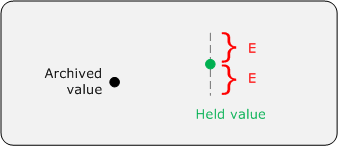
where E = deadband / 2
Deadband corresponds to the deviation fields for the CSD configuration.
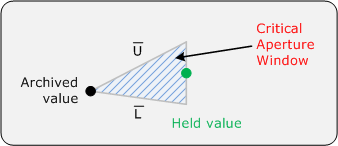
Step 2: Two lines, U and L, are drawn connecting the archived value with the upper and lower ends of the error bands associated with the held value. The slope of lines U and L is calculated defining a Critical Aperture Window.
|
Upper and lower slope lines |
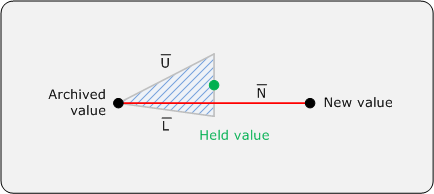
Step 3: The next new value received by the CVS is evaluated and it is determined if the line N connecting the archived value with the new value is between the upper and lower slopes.
If yes, line N intersects the error bands of the held value and becomes the new held value. The previously held value is discarded.
|
New value |
The critical aperture window from the lowest upper slope and the highest lower slope is reconstructed to ensure that the conditions necessary to compress all previous values will be preserved.
|
Critical aperture |
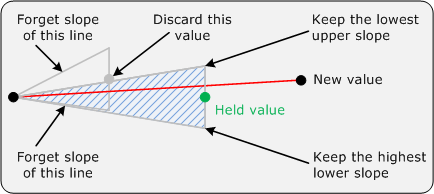
Step 3 is repeated.
As each new value is received by the CVS, the process continues, narrowing the critical aperture window and discarding unnecessary values as you go. If the process continues long enough, the critical aperture window closes, converging on the slope of the trend for this segment.
|
Critical aperture window closes |
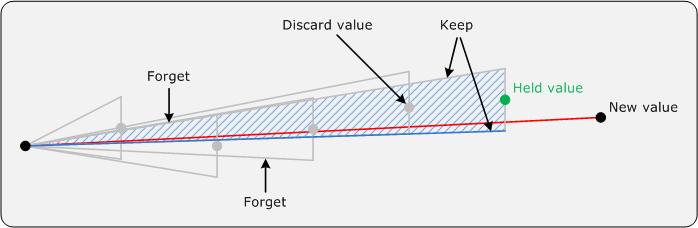
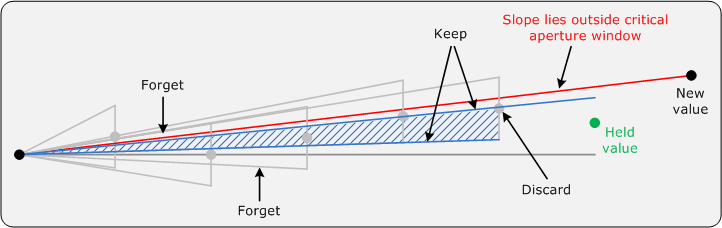
Step 4: A new value is received by the CVS and its slope is determined to lie outside of the critical aperture window. The held value is saved to the VHS, the new value becomes the held value, and the process resets to Step 1.
|
Process result |
Additional Data Thinning
For historical data that has already been written to the historian (uncompressed), the data can be thinned with the CSD compression method via the VHS Data Thinner Utility.


