Aging Thinning Model
In the aging model, each day is broken up into periods for which only a few values are saved. There are five different methods which can be used to determine how the entries within a specified period are saved. Periods are always calculated from the beginning of the current day so if a period length is 50,400s (14 hours), then each day will only be broken up into two periods even though the second period is less than 14 hours. Period lengths are specified in seconds and one second is the minimum period length, although a period length of zero may be specified to indicate that no thinning should occur.
Aging Thinning Model Properties
| Property | Description |
|---|---|
|
Period Thinning |
Select the desired period from the drop-down menu. The options include:
|
|
Delete unreliable records |
If enabled, deletes all records that are marked as unreliable. Note: All point types (analog, digital, enumeration, and string) marked as unreliable will be deleted, except if you select Min/Max period thinning, then only Analog point types marked as unreliable will be deleted. Use the Unreliable thinning model to delete all point types marked as Unreliable. |
| Period Definition | |
|
Starting at day |
Specifies the number of days between today and timestamp of an entry. For example, a day value of 60 would correspond to all entries at least 60 days older than today. Must be a value greater than 0, no thinning can occur on entries from the current day. |
|
Window size |
Sets the window size in seconds starting with the beginning of the current day. This determines how many time segments the VHS is divided into before the period thinning method is applied to each period. Must be whole numbers greater than 0 for thinning to occur. |
These methods are based on selecting entries that already exist in the historian. They will not create new entries that do not already exist in the VHS. This is why Average is not an option, taking an average for a period would necessitate creating a new value that has no timestamp or other tag information.
To Create an Aging Thinning Model
- On the Configure Thinning Models dialog box, click Create Model.
- Type a Model Name. This name should fully identify the model to ease selection of the appropriate model when creating rules.
- Select the Aging page.
- Select the period thinning option from the drop-down menu.
- If desired, enable Delete unreliable records.
- For each period range, type the Starting at day and Window size.
- Click Add/Save to add the range to the list box.
- To make changes to an existing range, select the range from the list and click Edit.
- To delete a range highlight and click Delete.
- To delete all ranges click Clear All.
- Repeat steps 6 and 7 for each desired range.
- Click Save Model. To discard all changes click Cancel.
- To make changes to an existing model, select the model from the list and click Edit Model.
- To delete an entire model highlight the model name and click Delete Model. Models may only be deleted if no rules are currently set to use the model.
- Click OK to return to the Configure Thinning Rules dialog box.
To Edit an Aging Thinning Model
- On the Configure Thinning Rules dialog box, select an existing thinning rule, and click Edit Rule.
- On the Configure Thinning Rules dialog box, select an existing thinning rule, and click View/Edit Models.
- Select an existing Aging thinning model, and click Edit Model.
- Edit the model as described in steps 4 -10 above.
Aging Thinning Model Example
|
Sample Aging Thinning Model |
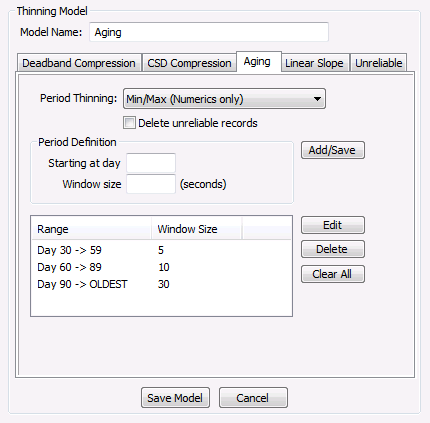
In the example above, history values newer than 30 days would not be subject to thinning. The minimum and maximum value would be saved in every 5 second period from days 30 to 59. History values 60 to 89 days old would be separated into 10 second periods, from which only the minimum and maximum value would be saved. All values older than 90 days would be separated into 30 second periods. The minimum and maximum value would be saved for every period because that is the type specified in the Period Thinning field. If it were set to Oldest Entry the periods will still be divided the same way but just the oldest entry would be saved rather than the minimum and maximum.


