Configuring VHS Data Forwarding
VHS Data Forwarding is defined in the source VHS configuration file (Vhs.cfg). The DESTINATION_* and FORWARDING_* keywords define data forwarding to the first service. DESTINATION_2_* and DESTINATION_3_* keywords define data forwarding to the second and third services, respectively. The destination sites are not sequential. That is, you can enable DESTINATION_3 without enabling DESTINATION_2.
|
Data Forwarding in VHS configuration file |
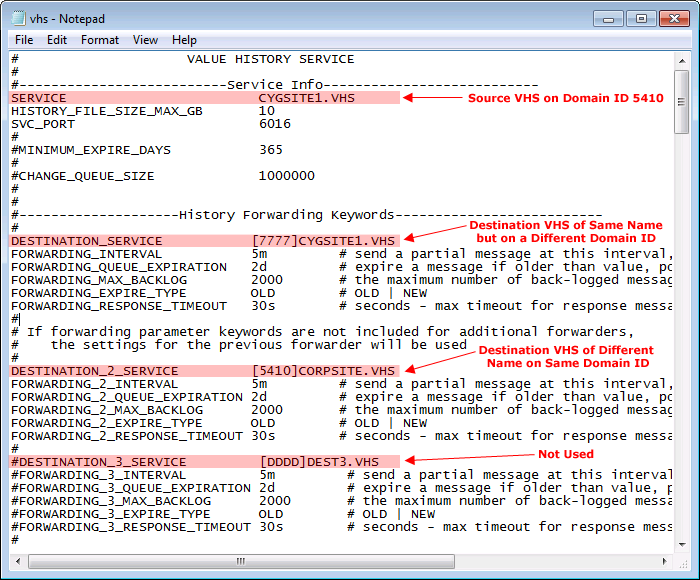
Configuration Keywords
The only required keyword for VHS Data Forwarding is the DESTINATION_SERVICE. The other keywords have default parameters. However, if the parameters for the first destination service (DESTINATION_SERVICE) have been customized, these will serve as the defaults for the second and third sites (DESTINATION_2_SERVICE and DESTINATION_3_SERVICE).
| Keyword | Description |
|---|---|
|
DESTINATION_SERVICE |
The name of the service to which forwarded data will be sent. The format is [DDDD]Site.Service where DDDD is replaced by the CygNet Domain where the history forwarder service is running. |
|
FORWARDING_INTERVAL |
This keyword can be used to define a "send interval" for forwarding messages. The source VHS compresses data into forward messages. Once the message is full it is sent to the destination VHS. If the message is not full by the specified "send interval" it is sent anyway. When active, the forwarding message will be sent to the destination VHS once the message is full or when the send interval is met, whichever comes first. The interval keyword value must specify an integer and an interval: s=seconds, m=minutes, h=hours, or d=day. |
|
FOWARDING_QUEUE_EXPIRATION |
The amount of time (in seconds, minutes, hours, or days) a message will be stored in the queue. Once a message exceeds the defined period it will be deleted from the queue. This keyword is used to manage the size of the queue. The queue time keyword value must specify an integer and an interval: s=seconds, m=minutes, h=hours, or d=day. |
|
FORWARDING_MAX_BACKLOG |
The maximum number of messages the queue is allowed to hold. When a new message is queued and the maximum backlog is exceeded, either the oldest or newest message will be dropped (depends on setting of the keyword FORWARDING_EXPIRE_TYPE). This keyword is used to manage the size of the queue. |
|
FORWARDING_EXPIRE_TYPE |
Determines which messages to delete (the oldest or newest message) when the queue reaches its maximum backlog. |
|
FORWARDING_RESPONSE_TIMEOUT |
The number of seconds the source VHS will wait for a response from the destination VHS for an acknowledgment of receipt before it tries resending a replication response message. The response time keyword value must specify an integer and an interval: s=seconds, m=minutes, h=hours, or d=day. |
To Configure and Start VHS History Forwarding
- Open the source VHS configuration file.
- Enable the set(s) of History Forwarding keywords.
- Type the parameters for the keywords.
- Save the changes and close the file.
- Stop and restart the source VHS so the configuration changes take effect.
- Add a dedicated RSM for the destination VHS. This step is optional but recommended.
- Add the destination VHS to the system and start it.
- If the destination VHS is on the same server as the source VHS, the SVC_PORT keyword will need to be changed in the destination service so that it does not conflict with the port the source VHS is running on.
- You may wish to change the MINIMUM_EXPIRE_DAYS keyword in the destination service to allow history to be retained for a longer period than the source VHS.
- Data is written to a destination VHS as it is collected by the source. It does not backfill automatically. If you wish to backfill the destination VHS with all data from the source VHS use the VHS Import/Export utility. This step is optional.


