Mass Balance Formula
See the following subsections below for more information:
- Calculation Flow Diagram
- Time-Weighted Average Flow Rate Formula
- Density Options for Volume Flow Rate
Calculation Flow Diagram
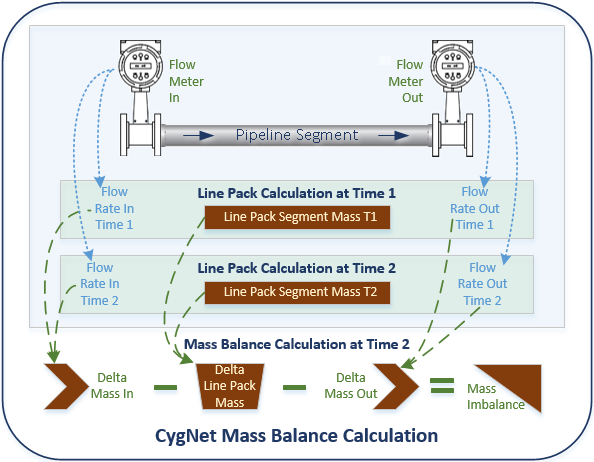
The following diagram shows a graphical representation of the Mass Balance calculation.
|
Click the thumbnail to see a |
Time-Weighted Average Flow Rate Formula
Mass balance is calculated using the formula described in the diagram above. If historical values are available, the flow rate (mass or volume (combined with its density)) is calculated as a time-weighted average between time T1 and time T2. If no history is available, the calculation uses the current CVS value.
Example
Consider the following values in the VHS for flow rate and line pack:
| Time | Flow Rate | Line Pack |
|---|---|---|
| 11:00 AM | 10 | |
| 11:01 AM | T1 - Last calculation | |
| 11:02 AM | 20 | |
| 11:03 AM | ||
| 11:04 AM | 30 | |
| 11:05 AM | T2 - Current calculation |
Then the time-weighted average flow rate will be calculated thus:
|
(10 * (11:02 – 11:01) + 20 * (11:04 – 11:02) + 30 * (11:05 – 11:04)) / (11:05 – 11.01) |
Density Options for Volume Flow Rate
When calculating mass balance using a volume flow rate source point, three density options are available:
- Segment inlet/outlet density — this value is calculated using the API 11.1 Base to Alternate formula with alternate temperature and pressure as inlet/outlet temperature and pressure.
- Segment average density — this value is calculated internally as part of the Line Pack calculation and written out to the Last Segment Calc: Calculated Average Density point. See this UDC on the UDC Map page (Optional Output UDCs) for each pipeline type.
- Other density value — another user-defined segment density value.
Note: Density options are configured when adding an inlet/outlet flow rate source point to a target pipeline segment. See Volume Flow Rate for more information.


