Service Log Settings
Use the Service Log Settings dialog box to view and modify application log settings on an ad hoc basis. This dialog shows the "raw" service log settings that are used when checking to see if a certain logging level is enabled inside the service. Any setting can be changed, but the new setting(s) will be lost when the service is restarted. See the SVCINFO Security Event for the applicable CygNet Service in the Security Reference topics for more information about security access levels for changing log settings.
The Service Log Settings dialog box is accessible from two locations in CygNet Software.
- From CygNet Explorer, right-click on any service in the left-hand service hierarchy pane to access the context menu, and then click Service Details to access the CygNet Service Information dialog box. In the lower left corner of the dialog, click Options to access the drop-down menu and then click Log Settings to access the Service Log Settings.
See CygNet Explorer or Viewing Service Details for more information.
- From the CygNet Service Diagnostics utility, click the View menu and then click Service Info to access the CygNet Service Information dialog box. Type your Service information in Site.Service format and then click Get Svc Info to display service details. In the lower left corner of the dialog, click Options to access the drop-down menu and then click Log Settings to access the Service Log Settings.
See CygNet Service Diagnostics Utility or Viewing Service Details for more information.
|
Service Log Settings |
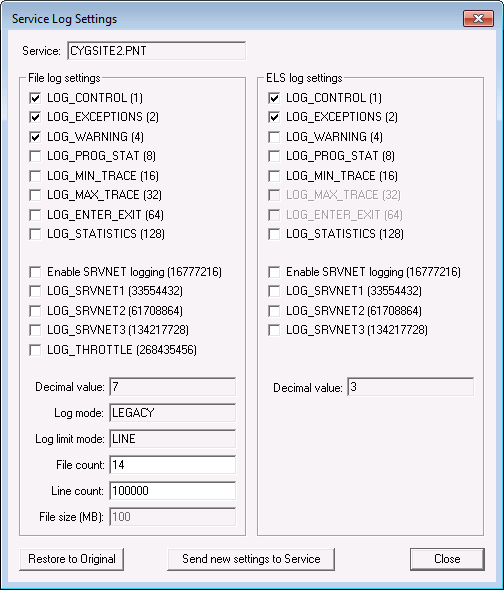
Service Log Settings Properties
The properties on the Service Log Settings dialog box are described below.
| Property | Description |
|---|---|
|
Service |
The service for which settings are being viewed, in the format [Domain]Site.Service |
| File log settings and ELS log settings | |
|
[Logging Options] |
These settings correspond to the types of information logged for each of the logging keyword options (LOGMASK_FILE and LOGMASK_ELS).
Possible options are as follows.
|
|
[SRVNET Logging Options] |
These settings correspond to the types of information logged for incoming and outgoing messages, depending on configured details. Possible options are as follows.
If only LOG_SRVNET1 is enabled, the service logs the message header, which includes: the message type, count, any errors, version, length, and who it was from/who it is going to. If LOG_SRVNET1 and LOG_SRVNET2 are set, the service logs the message header, plus the full contents of the message as a hex dump. If only LOG_SRVNET2 is enabled, the service logs the message header, which includes: the message type, count, any errors, version, length, and who it was from/who it is going to. If only LOG_SRVNET3 is enabled, the service logs the message header plus the full contents of the message as a hex dump. For File log settings only, LOG_THROTTLE provides real-time monitoring of the IP throttle status as an aid to tuning those settings. See the UIS Configuration File Keywords for more information about IP throttles. Note: It is possible that this setting may be discontinued in the future. |
|
Decimal value |
The Decimal Value is the value required for LOGMASK_ELS or LOGMASK_FILE keywords when calling the Global Functions SetGenserveInfo function. |
|
Log mode |
For File log settings only (not ELS logs): The Log mode shows what logging mode (LOGFILE_MODE keyword value) is being used. Possible values are LEGACY or EXTENDED. See Configuring Logging in the Logging section for more information. |
|
Log limit mode |
For File log settings only (not ELS logs): The Log limit mode shows what logging mode (LOGFILE_LIMIT_MODE keyword value) is being used to limit the size of each log file. Possible values are LINE or SIZE. See Configuring Logging in the Logging section for more information. |
|
File count |
For File log settings only (not ELS logs): The File count shows the maximum number of log files that a service will create before it starts re-using log file numbers. This corresponds to the LOGFILE_FILE_COUNT keyword value in the service configuration file. ExampleA count of two in LEGACY mode will produce UIS001.log, then UIS002.log, and then start back at UIS001.log. |
|
Line count |
For File log settings only (not ELS logs): When used to determine the content limit for a log file, the maximum number of lines allowed per file. This corresponds to the LOGFILE_LINE_COUNT keyword value in the service configuration file. |
|
File size |
For File log settings only (not ELS logs): When used to determine the content limit for a log file, the maximum size (in megabytes) allowed per file. This corresponds to the LOGFILE_FILE_SIZE keyword value in the service configuration file. |
|
Restore to Original |
Click to restore the original settings from the service configuration file. |
|
Send new settings to Service |
Click to send new settings to the Service. Note: Any change is temporary and will be reset upon service restart. |
* The difference between the first two (LOG_SRVNET1 and LOG_SRVNET2) and the second two (LOG_SRVNET2 and LOG_SRVNET3) is the first two don’t log trivial messages, which include: the ping message, the get service config info message (SvcDiags, SvcmonAdmin), the get associated services message, and the CConsole messages.


