Configuring a Trend Tool
Note: The Trend Tool requires Microsoft .NET Framework in accordance with CygNet system requirements. If you plan to associate a Trend Tool with a Note Feed Tool, it must be a Studio-wrapped Trend Tool, the Note Feed Tool must be a Studio-wrapped Note Feed Tool. Studio-wrapped tools are those available by default on the tool palettes. If you plan to use a Note Feed Tool without a Trend Tool, the Note Feed Tool requires both NoteFeed.dll and CxTrend.ocx. See the CygNet v9.8 System Requirements for more information.
A trend that includes series whose current value service is associated with a Note Service can be used to create, display, and edit notes. The tool's note display capability can be toggled on or off, but notes can be created regardless of the display mode enabled. You can use the note filter to define many criteria for filtering which notes are represented on a trend.
|
Click the thumbail to see |
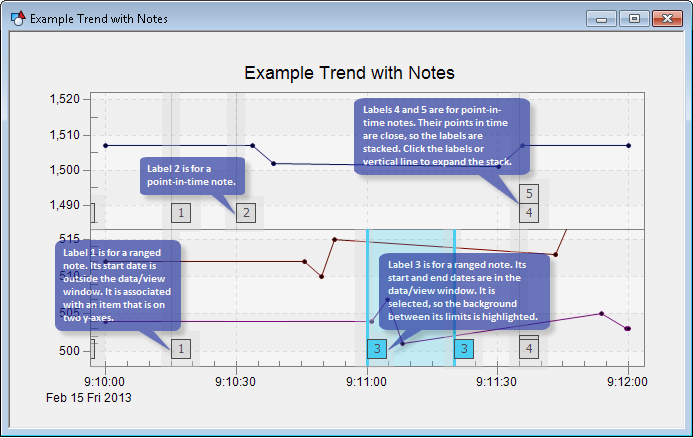
The Trend Tool can be used by itself or in combination with other associated tools. For instance, a Trend Tool can be supplemented by a Note Feed Tool. The Note Feed Tool is designed to interoperate with a single associated Trend Tool; it is not a stand-alone tool.
Carefully consider how you want to interact with notes so that you can design as clear and useful a GUI as possible. For example, the use of some features or properties in combination might work fine for a GUI with few notes, but the same combination might result in a cluttered GUI if numerous notes appear on a typical view window.
See also Using a Trend Tool.
To Configure a Trend for Use with Notes
- In CygNet Studio, add a Trend Tool to the appropriate screen and configure it as you would any other Trend Tool. See also CygNet Studio – Configuring the Trend Tool.
- Address note-related properties. These are on the Trend Tool's Property Sheet and/or on its ActiveX property pages. The most relevant properties are listed below. See also Trend Tool – Properties.
- When you are done configuring the various note properties for a Trend Tool, save and run the trend.
Relevant Properties
The following is a list of the properties most relevant to the use of notes:
See also Trend Tool – Properties.


