Defining an Event Record and Configuring Messages
To Define the Event Record and Configure Messages
- Using CygNet Explorer, right-click in the GNS pane and select New.
- Type the ID and Description for the record.
- In the Type box, select Event.
- Click on the Messages page.
- In the Set area, type the message to be sent when the alarm is set. Click … to insert tokens into string wherever applicable. See A Note About Token Testing Behavior.
- Use the Email Subject field if the recipient is to receive an email message.
- Use the Message field if a recipient is to receive a message of the following type:
- alphanumeric message
- email message
- voice message via the Dialogic board or SIP Server.
- Use the Numeric Msg field if a recipient is to receive a numeric page.
- Use the Wave Msg field if a recipient is to be played a WAV file via the Dialogic board or SIP Server.
- In the Clear area, type the message to be sent when the alarm is cleared. Click … to insert tokens into string wherever applicable. See A Note About Token Testing Behavior.
- Use the Email Subject field if the recipient is to receive an email message.
- Use the Message field if a recipient is to receive a message of the following type:
- alphanumeric message
- email message
- voice message via the Dialogic board or SIP Server.
- Use the Numeric Msg field if a recipient is to receive a numeric page.
- Use the Wave Msg field if a recipient is to be played a WAV file via the Dialogic board or SIP Server.
|
GNS Messages |
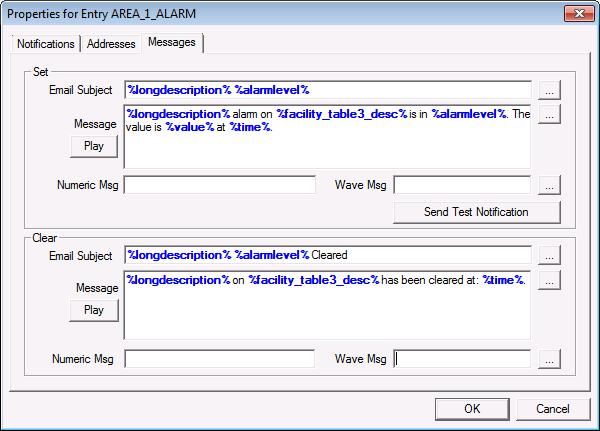
The properties on the Messages page are described in the following table.
| Property | Description |
|---|---|
|
Set/Clear Email Subject |
Specifies the subject line for email messages. Tokens can be used. See Mail Messages for more information. |
|
Set/Clear Message |
Specifies the message for alphanumeric notifications. Tokens can be used. Click Play to preview the message for Voice Address notifications. See Alphanumeric pager and Voice Address for more information. Note: Messages are limited to 1800 characters. |
|
Set/Clear Numeric Msg |
Specifies the message for Numeric Pager notifications. See Numeric Pager for more information. |
|
Set/Clear Wave Msg |
Specifies the Wave file(s) for WAV Address notifications. Multiple files can be concatenated using a semicolon. Tokens can be used. See WAV Address for more information. |
|
Send Test Notification |
Click Send Test Notification to send a test notification to all recipients. The notification is identified as "test." |
A Note About SMS Messages
Some SMS gateway providers limit text messages to 160 characters. Others do not. Using tokens to compose your outgoing notification message may increase the size of the message beyond the 160-character limit. Since the Ack ID is appended to the end of the message, it may be truncated, making acknowledgment difficult.
A Note About Token Testing Behavior
When testing GNS messages using the Play button or Send Test Notification function, CygNet Tokens will display as literal text rather than resolved values. This behavior is expected for testing purposes only and does not indicate that the tokens are malfunctioning. During actual alarm notifications, CygNet Tokens will resolve properly and display the appropriate data values.
More:
 Customizing Voice Address Messages


