Installing the CygNet ODBC Driver
For most situations, use the CygNet Client Installer to install a CygNet ODBC driver.
- 32-bit ODBC driver is located in the SUPPORT folder in the APPS service.
- 64-bit ODBC driver is located in the SUPPORT6 folder in the APPS service.
The 32-bit and 64-bit ODBC drivers differ in some significant ways. See the sections below that are specific to the kind of ODBC driver you require.
Version management of the ODBC driver is performed when a CygNet application that uses the driver is started or when the ODBC driver is selected from the Start menu shortcut. The ODBC driver is not version managed when non-CygNet applications that use the driver are opened, such as Microsoft Access.
Installing the 32-Bit CygNet ODBC Driver
The 32-bit CygNet ODBC driver (CygNetOdbc.dll) operates on both 32-bit and 64-bit operating systems. Once installed, all 32-bit ODBC files are found in the CygNet/Support/ODBC directory.
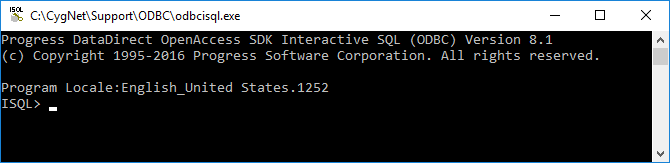
Access the ODBC application using the SQL console command line application (odbcisql.exe). The ODBC driver has two configuration (oasql.ini and oadm.ini) files that are used to set configuration options. The settings in these files are specific to the computer where ODBC is running.
32-bit ODBC Files
The 32-bit ODBC files are found in the following locations:
| 32-bit File | Purpose | Location |
|---|---|---|
|
CygNetOdbc.dll |
CygNet ODBC driver (32-bit) |
CygNet/Support/ODBC/bin |
|
odbcisql.exe |
DataDirect OpenAccess SDK Interactive SQL (ODBC) utility |
CygNet/Support/ODBC |
|
oasql.ini |
Configuration settings file |
CygNet/Support/ODBC |
|
oadm.ini (and backups) |
Configuration settings file |
CygNet/Support/ODBC/cfg |
|
ReadOdbc.txt |
Instructions to complete your CygNet ODBC Driver installation |
CygNet/Support/ODBC |
|
oaadmin81.msc |
DataDirect OpenAccess SDK Management Console. See Configuring Advanced Options for more information. |
CygNet/Support/ODBC/bin |
Installing the 64-Bit CygNet ODBC Driver
The 64-bit CygNet ODBC driver (CygNetOdbc64.dll) operates only on a 64-bit operating system. Once installed, all 64-bit ODBC files are found in the CygNet/Support64/ODBC directory.
Access the ODBC application using the SQL console command line application (odbcisql.exe). The ODBC driver has two configuration (oasql.ini and oadm.ini) files that are used to set configuration options. The settings in these files are specific to the computer where ODBC is running.
64-bit ODBC Files
The 64-bit ODBC files are found in the following locations:
| 64-bit File | Purpose | Location |
|---|---|---|
|
CygNetOdbc64.dll |
CygNet ODBC driver (64-bit) |
CygNet/Support64/ODBC/bin |
|
odbcisql.exe |
DataDirect OpenAccess SDK Interactive SQL (ODBC) utility |
CygNet/Support64/ODBC |
|
oasql.ini |
Configuration settings file |
CygNet/Support64/ODBC |
|
oadm.ini (and backups) |
Configuration settings file |
CygNet/Support64/ODBC/cfg |
|
ReadOdbc.txt |
Instructions to complete your CygNet ODBC Driver installation |
CygNet/Support64/ODBC |
|
oaadmin81.msc |
DataDirect OpenAccess SDK Management Console. See Configuring Advanced Options for more information. |
CygNet/Support64/ODBC/bin |
DataDirect OpenAccess SDK Interactive SQL (ODBC) Utility
The version of the CygNet ODBC driver matches the version of CygNet operating on your host. The version of the DataDirect OpenAccess SDK Interactive SQL (ODBC) console (odbcisql.exe) is different from the CygNet ODBC driver version.
|
ODBC SQL Console |