CygNet SQL Executor Utility
The CygNet SQL Executor utility uses the CygNet ODBC driver to write iSQL statements. These results can be saved to a CSV file for later review. You can use the utility for UPDATE, DELETE, SELECT, and a variety of other statements.
The CygNet SQL Executor utility is stored in the CygNet\Utilities directory (SqlExecutor.exe) on the host server. To start the utility, use Windows Explorer to browse to the directory and double-click the program icon.
Note: You can also set up this utility to be installed and launched (started) via CygNet Client Installer so that the application can be version managed. See Version Management for instructions on how to do this.
|
CygNet SQL Executor |
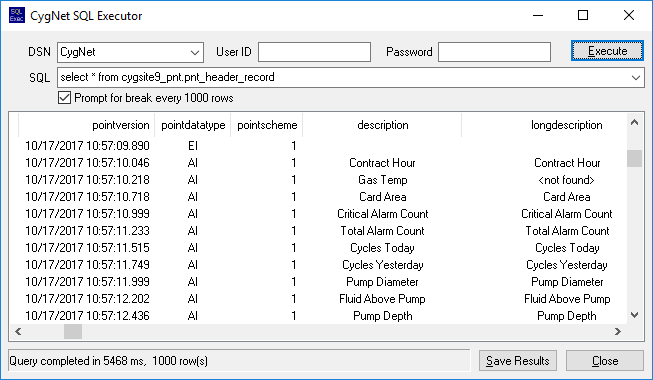
The default DSN (data source name) is CygNet. If you have created a custom DSN, you can type the name in the DSN field.
The User ID and Password are not required when using a CygNet data source.
The SQL box maintains a list of previous statements.
You can save the results of your query to a CSV file that is automatically stored in the CygNet\Utilities directory by clicking Save Results.
Table and Column Names
View table and column names by running the batch files installed in the CygNet\Support\ODBC\Queries directory. Running the batch file creates a .txt file with the corresponding data.
Note: The batch file command-line syntax requires that the site, service, and table names are in all lowercase.
| Batch File | Description | Command Line |
|---|---|---|
|
oatables.bat |
Names of tables in a service |
oatables site service |
|
oacolumns.bat |
Names of columns in a table |
oacolumns site service table name |
|
oastats.bat |
Names of indexes on each table (used for query optimization) |
oastats site service table name |


