Installing and Starting the CygNet OPC HDA Server
This topic describes the following:
- Install the CygNet OPC HDA Server
- CygNet OPC HDA Server Name
- Start and Stop the CygNet OPC HDA Server
- Register Points with CygNet OPC HDA Server
Install the CygNet OPC HDA Server
The CygNet OPC HDA Server can be installed using the CygNet Client Installer (CInstall.exe) utility; the application can be found under SUPPORT. The CygNet Client Installer sets up integrated version management to ensure that you have the latest version of the application files and that all files are registered properly. See CygNet Client Installer for more information.
Note: The CygNet OPC HDA Server now includes updated OpcFoundation OPC Core Components and will upgrade these system-level components automatically when you version manage the executable. See OPC Core Components for more information.
The following files are necessary for installing the CygNet OPC HDA Server.
Found in the APPS\SUPPORT folder and installed to the CygNet\Support\CygNetOPCHDA folder:
- CygNetOpcHda.app
- CygNetOPCHDA.exe
- CygNetOpcHda.ico
- CygNetOpcHda.rsp
Found in the APPS\SUPPORT folder and installed to the Windows\SysWOW64 folder:
- Opccomn_ps.dll
- Opchda_ps.dll
- Opcproxy.dll
- WtHDASvr.dll
To Install the CygNet OPC HDA Server Using the CygNet Client Installer
-
Open the CygNet Client Installer (Start Menu > All Programs > CygNet > CygNet Client Installer). The CygNet Client Installer/Launcher dialog box will be displayed.
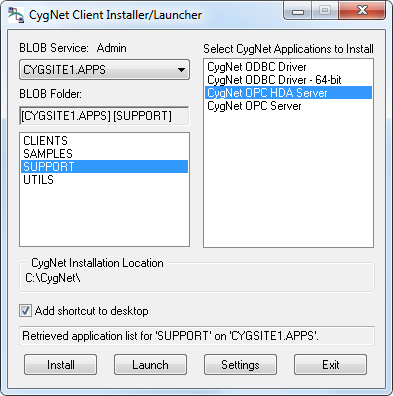
CygNet Client Installer/Launcher
- On the Blob Service: Admin drop-down menu, select the APPS Service.
- In the Blob Folder: list select Support.
- In the Select CygNet Applications to Install list select CygNet OPC HDA Server.
- Click the check box adjacent to Add shortcut to desktop to select/clear this feature.
- Click Install. A confirmation message will be displayed asking if you want to start the application.
- Select Yes to launch and register the CygNet OPC HDA Server.
Note: If your CygNet\Support\CygNetOPCHDA folder does not have the version management files required to install the OPC HDA server (.rsp and .app files), contact CygNet Support.
CygNet OPC HDA Server Name
The name of the CygNet OPC HDA Server is: CygNet.OPCHDAServer.1.
Start and Stop the CygNet OPC HDA Server
- Starting the CygNet OPC HDA Server — The CygNet OPC HDA Server can be started by running CygNetOPCHDA.exe. Also, it will start automatically starts when a client connects to it. When the server is running, the CygNet OPC HDA Server icon
 is displayed in the task bar.
 - Stopping the CygNet OPC HDA Server — The server will continue to run as long as there is a valid connection. If the server does not detect a connection for 60 seconds, it will close. You can also manually stop the server by right-clicking on the server icon in the task bar and then clicking Shutdown Server.
Register Points with the CygNet OPC HDA Server
The following CygNet tag string formats are supported for the CygNet OPC HDA Server:
| CygNet Tag String Format Type | Accepted OPC Identifier Format |
|---|---|
|
Tag String |
Site.Service.PointID |
|
Long Tag String |
Site.Service:LongID |
|
Full Tag String |
Site.Service.PointID:LongID |
|
Facility Tag String |
Site.Service::Facility.UDC |
|
External ID Tag String |
Site.Service:::MixedCaseExternalId |
Note: The most efficient way to register tags with the CygNet OPC HDA Server is to provide the tag format as either Site.Service.PointID or Site.Service:LongID. Providing other tag formats will incur some additional messaging to the PNT service to resolve the tag to the appropriate CygNet point.
See Omitting the Site.Service Specifier in the OPC Item for the CygNet OPC HDA Server for more information about omitting the Site.Service specifier from an OPC request.


