Omitting the Site.Service Specifier in the OPC Item for the CygNet OPC HDA Server
It is possible to optionally omit the Site.Service specifier from an OPC request for the CygNet OPC Server and the CygNet OPC HDA Server.
Both the CygNet OPC Server and the CygNet OPC HDA Server use an OPC identifier when requesting data for a CygNet point from a CygNet current value service (for example, OPCIS, UIS). By default, the OPC identifier for a CygNet point is its fully qualified tag string.
For example, the Facility Tag String format is MYSITE.UIS::MyWell.PDIFF;ALARMACK, provides access to real-time data for the alarm acknowledgment status UDC (ALARMACK) for the MyWell differential pressure point (PDIFF) in the MySite UIS (MYSITE.UIS).
However, it is possible to omit the Site.Service specifier and the period or colon(s) portion of the CygNet tag string when making an OPC item request.
To Omit the Site.Service Name
You can omit the Site.Service specifier from the OPC identifier, by creating a default text file, named OpcServerDefaultSiteServices.txt, which contains a list of one or more default Site.Service names. At startup the OPC/OPC HDA server will read the text file, prepend the Site.Service name(s) from the list, add necessary periods or colons to the OPC identifier, and attempt to resolve the point.
- Configure the OPC identifiers without a Site.Service specifier.
- Create a default text file listing the SiteServices using a text editor such as Notepad. Each Site.Service name must be listed on a separate line:
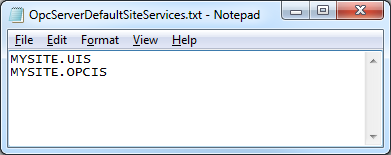
|
| Sample OpcServerDefaultSiteServices.txt |
- Save the file as OpcServerDefaultSiteServices.txt to the same directory where server executable is located, for example:
- By default, CygNetOpc.exe is located in C:/CygNet/Support/CygNetOPC
- By default, CygNetOpcHda.exe is locatedin C:/CygNet/Support/CygNetOPCHDA
- Restart the server executable to read the OpcServerDefaultSiteServices.txt file.
Note: The OpcServerDefaultSiteServices.txt is not included in the version management file (.rsp) by default, so if you want to distribute this file you would need to add it the .rsq file.
Tag String Formats and Resolution Notes
The following CygNet tag string formats are supported when a local text file is used:
| CygNet Tag String Format Type | Accepted OPC Identifier Format (full tag string, no local text file) |
Accepted OPC Identifier Format (with local text file*) |
|---|---|---|
|
Tag String |
Site.Service.PointID |
PointID |
|
Long Tag String |
Site.Service:LongID |
LongID |
|
Full Tag String |
Site.Service.PointID:LongID |
PointID:LongID |
|
Facility Tag String |
Site.Service::Facility.UDC |
Facility.UDC |
|
External ID Tag String |
Site.Service:::MixedCaseExternalId |
MixedCaseExternalId |
* Site.Service. or Site.Service: or Site.Service:: or SiteService::: will be prepended.
Note the following:
-
If the OPC item does not contain a Site.Service specifier and no default text file is provided, the OPC item will fail to resolve
-
If the supplied Site.Service names yield more than one resolved tag, the OPC item request will fail
-
If the specified OPC item is ambiguous and exists on multiple services listed in the default text file, the OPC item request will fail to resolve
-
All resolution errors will be logged by the server to the log file
-
If no default text file is provided, all OPC identifiers must contain a Site.Service specifier.
-
See Using External ID-based Tags in the OPC Item for the CygNet OPC HDA Server for more information about using ExternalId tags.
-
The CygNet OPC HDA Server does not support the use of point properties in the OPC HDA tag format because the server retrieves a list of historical values, not single attributes for a point as the CygNet OPC Server does.


