Maintaining the CygNet OPC UA Address Space
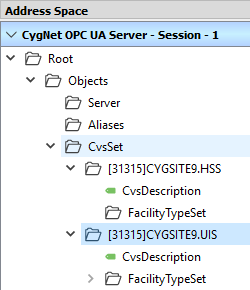
The address space is the core of an OPC UA server and is a representative model of the data the server exposes. The collection of objects and related information that an OPC UA server makes available to an OPC UA client is referred to as its address space. The address space defines the internal node and folder hierarchical structure, the access-rights for each node, how the data for each node will be provided, and display names for each node. An OPC UA server exchanges data in a standardized way with OPC UA clients via an address space model.
The content of the address space is determined by a set of selected information models, which control what nodes are created, the relationship between nodes, and the value of selected attributes of the nodes.
|
OPC UA Server Address Space |
Run the Model Builder Script
The CygNet OPC UA Server needs a CygNet Address Space to define the CygNet data to be shared. This is generated via a special model builder script, which is included in CygNet OPC UA setup program and is installed along with the CygNet OPC UA Server application. This script must be executed to generate the CygNet address space for the CygNet system at the following times:
- when the CygNet OPC UA Server is first set up, and then
- every time changes are made to the CygNet system that must be exposed in OPC UA (such as adding or removing points or facilities, changes to metadata, etc.).
To create the CygNet Address Space
The node creation process works in the following way:
- Modify the CygNetOpcUaServer.Config.xml file with the appropriate <ModelBuilderConfiguration> settings.
Note: This step only needs to be performed the first time you build the address space, and then again only if you want the OPC UA Server to reference a different set of CygNet services, or if you want to change which CVS, Facility, or Point attributes are used to create display names for their nodes.
This step does not need to be completed each time you want your OPC UA Server to reflect changes to your CygNet services. - Ensure the CygNet Bridge website is started using IIS Manager.
- Run the GenerateCygNetModel.ps1 script. The model builder script generates a CygNetModel.json file, which encapsulates the CygNet Address Space. This file is used by the OPC UA Server and should never be modified manually. The script is installed here: C:\ProgramData\Weatherford\CygNetOpcUaServer\GenerateCygNetModel.ps1
- Right-click the script and select Run with Powershell to execute the script.
- Or, start Windows PowerShell and navigate to the folder where the script file is located and execute the script. Use this option if you want to monitor the build process.
- Once complete the CygNetModel.json file will be written to the same folder.
- Restart the OPC UA Server.
Note: The amount of time it takes to generate the CygNetModel.json file, which defines the address space, depends on the size of your CygNet system.
Schedule the Model Builder Script
The GenerateCygNetModel.ps1 script can either be run manually with Windows PowerShell, or it can be scheduled to run as a task with the Windows Task Scheduler.
The frequency with which the script is run is dependent on the requirements of your enterprise, but it is important to keep the CygNet OPC UA Server in sync with any changes made to the CygNet system (e.g., new and modified points and facilities, updated metadata, etc.), so best practice recommends that the script be run whenever a change is made that would need to be reflected in the OPC UA server.
Time to Rebuild the CygNet Model
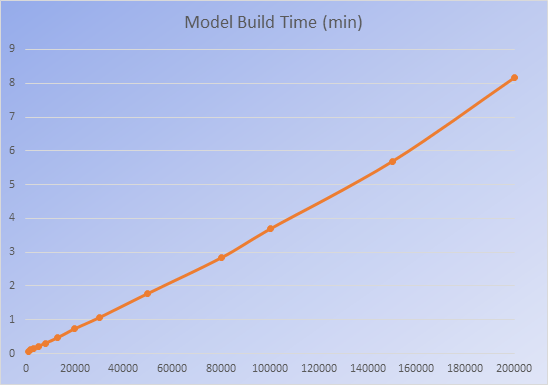
Generating a new CygNet model will take more time as the number of points in your system increases. The following chart estimates the time in minutes that the CygNet model will take to rebuild based upon the number of CygNet points included in the model. Your results will vary depending on attributes of your host machine and network environment such as CPU, memory, and network latency.
|
CygNet Model Build Time |