Point Status Bits
A point record may contain up to 48 Status Bits, which are used to provide status information about a point record in a Current Value Service (CVS). The StatusBits element of the CvsMetadata defines all Status Bits for a specified CygNet Point Scheme. The point state is based on the Status Bits, which are associated with point types. Status Bits are stored in blocks.
Status Bit Types
There are three types of Status Bits:
- System Status Bits (17)
- Configurable Status Bits (15)
- User Status Bits (16)
See Status Bit Blocks below for information about the bit positions of each of these Status Bits.
System Status Bits
There are 17 system bits, displayed in the CvsMetadata with a calculation type of SYSTEM. Each system status bit performs a specific role in a CygNet system. The bit IDs for these Status Bits are predefined within CygNet and should not be changed.
Basic Point Information — four Status Bits provide information on the basic state of the point:
- INITIALIZED (Initialized) — this bit is set when a point is initialized
- UPDATED (Updated) — this bit is set when a point is initialized
- UNRELIABLE (Unreliable) — this bit is set when a point is deemed unreliable
- EXTERNAL_VALUE (External Value) — this bit is set when a point’s value is updated manually or by a SetPoint command
Basic Alarm Information — four Status Bits provide basic information about the state of alarms for the point:
- ALM_SUPPRESSED (Alarm Suppressed) — this bit is set when the alarm suppression feature is enabled. See Suppressing Alarms for more information
- ALM_PRI_CAT1 (Alarm Priority Category Bit 1)
- ALM_PRI_CAT2 (Alarm Priority Category Bit 2)
- ALM_PRI_CAT3 (Alarm Priority Category Bit 3)
Alarm Priority Category Bits 1-3 designate which Alarm Priority category the point currently falls under. Because there are three bits there can be a total of eight (0-7) possible categories for a point to fall under. Category 0 represents a point that does not have an Alarm Priority Category. Categories 1-7 correspond to the configured AlarmPriorityCategories. See Alarm Priority Categories for more information.
Point Type — three Status Bits identify with which point type the point is associated.
- STRING_ENUM (Reserved 1) — this bit identifies points as either string or enumeration point types.
- DIGITAL_ANALOG (Reserved 2) — this bit identifies points as either analog or digital point types.
The first two Status Bits, STRING_ENUM and DIGITAL_ANALOG, work in tandem to define the point type:
- If both DIGITAL_ANALOG and STRING_ENUM bits not set = Analog
- If only DIGITAL_ANALOG bit set = Digital
- If both DIGITAL_ANALOG and STRING_ENUM bits set = Enumeration
- If only STRING_ENUM bit set = String
- IN_OUT (Reserved 3) — this bit identifies the point as an input or output point type. This bit is cleared for input point types and set for output point types.
Point Scheme — the four Point Scheme Status Bits, SCHEME1-4, identify with which Point Scheme the point is associated. These bits are a binary representation of the available Point Scheme IDs 0-15. A CvsMetadata file can define up to 16 custom Point Schemes (Schemes 0 -15). If the CygNet Standard Point Scheme is used, its default is Scheme 0.
- SCHEME1 (Reserved 4)
- SCHEME2 (Reserved 5)
- SCHEME3 (Reserved 6)
- SCHEME4 (Reserved 7)
VHS Information — Two VHS information Status Bits are used by the VHS to track if a VHS entry has been edited or deleted by a user:
- VHS_USER_EDITED (Reserved 8) — when a VHS entry is edited, the VHS_VALUE_DELETED status bit is set, thereby removing the entry from the default list, and a new entry is created with the VHS_USER_EDITED status bit enabled.
- VHS_VALUE_DELETED (Reserved 9) — when a VHS entry is deleted, the VHS_VALUE_DELETED status bit is set and the entry is removed from the default view. This provides the ability to review what changes have been made to the history of a point. The deleted values will remain in the VHS until they are purged from the system.
Configurable Status Bits
Configurable bits are used to facilitate CVS alarm calculations as well as CAS and GNS reporting. They are the only Status Bits that support CVS alarm calculations. Each alarm listed on the Analog/Digital/Enumeration/String Alarm Settings page of the PNT Editor corresponds to a configurable bit.
There are 15 configurable bits available, CONFIG1 - CONFIG15, and each bit can have its own associated calculation type and parameters. In addition to supporting CVS alarm calculation types, configurable bits also support the EXTERNAL calculation type. This lets you configure a status bit to be set externally, yet still have the option of reporting to the CAS or GNS in the same way as CVS alarm calculation types.
- CONFIG1 (Out-of-Range)
- CONFIG2 (Low Alarm)
- CONFIG3 (Low Warning)
- CONFIG4 (High Warning)
- CONFIG5 (High Alarm)
- CONFIG6 (High Deviation)
- CONFIG7 (Unused 1)
- CONFIG8 (Unused 2)
- CONFIG9 (Unused 3)
- CONFIG10 (Unused 4)
- CONFIG11 (Unused 5)
- CONFIG12 (Unused 6)
- CONFIG13 (Unused 7)
- CONFIG14 (Unused 8)
- CONFIG15 (Unused 9)
See Config Bit State Page for more information.
User Status Bits
There are 16 user bits available, User Bit 1 – User Bit 16, which are configurable by a user to associate special status information about a point. These bits only support the EXTERNAL calculation type. A user can set these bit types manually or through an API.
- USER1 (User Bit 1)
- USER2 (User Bit 2)
- USER3 (User Bit 3)
- USER4 (User Bit 4)
- USER5 (User Bit 5)
- USER6 (User Bit 6)
- USER7 (User Bit 7)
- USER8 (User Bit 8)
- USER9 (User Bit 9)
- USER10 (User Bit 10)
- USER11 (User Bit 11)
- USER12 (User Bit 12)
- USER13 (User Bit 13)
- USER14 (User Bit 14)
- USER15 (User Bit 15)
- USER16 (User Bit 16)

Status Bit Blocks
Each point record in a Current Value Service has 48 associated Status Bits. These Status Bits are stored in one 16-bit block and one 32-bit block. The Status Bit Details field of the Point Properties dialog box displays the Set state, Description, and Bit Name ("bitid" attribute) of each status bit.
|
Status Bit Details |
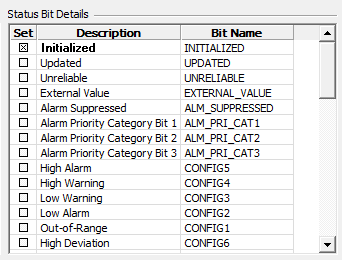
The following tables shows the bit positions of each status bit.
Base Status Bits
The 16-bit block section, also described as the Base Status Bits, contains a 16-bit block of Status Bits 0 to 15, including System Status Bits and Config Status Bits.
| Bit # | Status Bit Name | Status Bit Desc | Bit Type | Hex | Decimal |
|---|---|---|---|---|---|
| 0 | INITIALIZED | Initialized | System | 0x0001 | 1 |
| 1 | UPDATED | Updated | System | 0x0002 | 2 |
| 2 | UNRELIABLE | Unreliable | System | 0x0004 | 4 |
| 3 | CONFIG1 | Out-of-range | Config | 0x0008 | 8 |
| 4 | CONFIG2 | Low alarm | Config | 0x0010 | 16 |
| 5 | CONFIG3 | Low warning | Config | 0x0020 | 32 |
| 6 | CONFIG4 | High warning | Config | 0x0040 | 64 |
| 7 | CONFIG5 | High alarm | Config | 0x0080 | 128 |
| 8 | CONFIG6 | High deviation | Config | 0x0100 | 256 |
| 9 | CONFIG7 | Unused 1 | Config | 0x0200 | 512 |
| 10 | STRING_ENUM | Reserved 1 | System | 0x0400 | 1024 |
| 11 | CONFIG8 | Unused 2 | Config | 0x0800 | 2048 |
| 12 | DIGITAL_ANALOG | Reserved 2 | System | 0x1000 | 4096 |
| 13 | IN_OUT | Reserved 3 | System | 0x2000 | 8192 |
| 14 | CONFIG9 | Unused 3 | Config | 0x4000 | 16384 |
| 15 | CONFIG10 | Unused 4 | Config | 0x8000 | 32768 |
Extended Status Bits
The 32-bit block section, also described as the Extended Status Bits, displays a 32-bit block of Status Bits, including User, System, and Config Status Bits.
| Bit # | Status Bit Name | Status Bit Desc | Bit Type | Hex | Decimal |
|---|---|---|---|---|---|
| 0 | USER1 | User bit 1 | User | 0x00000001 | 1 |
| 1 | USER2 | User bit 2 | User | 0x00000002 | 2 |
| 2 | USER3 | User bit 3 | User | 0x00000004 | 4 |
| 3 | USER4 | User bit 4 | User | 0x00000008 | 8 |
| 4 | USER5 | User bit 5 | User | 0x00000010 | 16 |
| 5 | User6 | User bit 6 | User | 0x00000020 | 32 |
| 6 | User7 | User bit 7 | User | 0x00000040 | 64 |
| 7 | USER8 | User bit 8 | User | 0x00000080 | 128 |
| 8 | USER9 | User bit 9 | User | 0x00000100 | 256 |
| 9 | USER10 | User bit 10 | User | 0x00000200 | 512 |
| 10 | USER11 | User bit 11 | User | 0x00000400 | 1024 |
| 11 | USER12 | User bit 12 | User | 0x00000800 | 2048 |
| 12 | USER13 | User bit 13 | User | 0x00001000 | 4096 |
| 13 | USER14 | User bit 14 | User | 0x00002000 | 8192 |
| 14 | USER15 | User bit 14 | User | 0x00004000 | 16384 |
| 15 | USER16 | User bit 16 | User | 0x00008000 | 32768 |
| 16 | SCHEME1 (1) | Reserved 4 (Point Scheme 1) | System | 0x00010000 | 65536 |
| 17 | SCHEME2 (1) | Reserved 5 (Point Scheme 2) | System | 0x00020000 | 131072 |
| 18 | SCHEME3 (1) | Reserved 6 (Point Scheme 3) | System | 0x00040000 | 262144 |
| 19 | SCHEME4 (1) | Reserved 7 (Point Scheme 4) | System | 0x00080000 | 524288 |
| 20 | ALM_PRI_CAT1 (2) | Alarm Priority Cat 1 | System | 0x00100000 | 1048576 |
| 21 | ALM_PRI_CAT2 (2) | Alarm Priority Cat 2 | System | 0x00200000 | 2097152 |
| 22 | ALM_PRI_CAT3 (2) | Alarm Priority Cat 3 | System | 0x00400000 | 4194304 |
| 23 | EXTERNAL-VALUE | External value | System | 0x00800000 | 8388608 |
| 24 | VHS_USER-EDITED | Reserved 8 | System | 0x01000000 | 16777216 |
| 25 | ALM_SUPPRESSED | Alarm suppressed | System | 0x02000000 | 33554432 |
| 26 | CONFIG11 | Unused 5 | Config | 0x04000000 | 67108864 |
| 27 | CONFIG12 | Unused 6 | Config | 0x08000000 | 134217728 |
| 28 | CONFIG13 | Unused 7 | Config | 0x10000000 | 268435456 |
| 29 | VHS_VALUE_DELETED | Reserved 9 | System | 0x20000000 | 536870912 |
| 30 | CONFIG14 | Unused 8 | Config | 0x40000000 | 1073741824 |
| 31 | CONFIG15 | Unused 9 | Config | 0x80000000 | 2147483648 |
Extended Status Bit Usage in CygNet
Examples of user and config status bit usage include:
- The Energy Load Forecasting system uses User Bits to indicate if hourly historical or forecast input values are missing or need to be filled. See Current Value Status Bits for more information.
- CygNet Studio Image Tool. You can set bit states for various configurable point Status Bits.
- The Line Pack driver sets Config Status Bits under certain conditions. See Configuring Calculation Settings - Status Bits.
- OPC quality data is written to User Bits 1 - 8 for OPCIS data points. See OPC Quality Data.
- CxScript.GlobalFunctions.SetPointEx2
- Text Import EIE
- DNP3 EIE
- DNP3 Emerson EIE

