The Relationship between Status Bits, Point Status, Point States, Alarm Conditions, Alarm Priority Categories, and the Point Scheme
This long-form topic describes the following important CygNet concepts and how they work together to provide status information about a real-time record (RTR) in a Current Value Service (CVS):
Introduction
Every point in CygNet has a real-time record. The RTR comprises a value, the timestamp of the value, and 48 Status Bits.
Each point is assigned to a Point Scheme, which defines how the Status Bits apply to the Point Types, bit descriptions, the display order in dialog boxes boxes in the CygNet user interface, the calculation order, and the precedence. The Point Scheme also defines how the bits are used to determine Point States, the precedence of the Point States, the bits and other parameters used to evaluate the value for an Alarm Condition, how Point States apply per Point Type, Alarm Priority Categories, default colors, Point State tokens, and more.
When a point gets an update and its bits get toggled, the Point Status is calculated. This is a hexadecimal representation of the bits set. In addition, the Point State is calculated based on the bits. The bits may resolve to more than one Point State at any given time; however, the Point Scheme also defines the precedent of the various states. For example, if the bits are set such that both a 'low warning' and 'low alarm' state exist, and the 'low alarm' state is defined as having higher precedence, the Point State would show as 'low alarm' in the various CygNet user interfaces where the point is displayed.
Status Bits
Status Bits are a component of a point's real-time record and each point record contains 48 Status Bits. These bits comprise one 16-bit block, the Base Status Bits, and a 32-bit block, the Extended Status Bits. The bit numbering for each block starts at 0 for the least significant bit (LSB). The Bit Name cannot be changed.
There are three types of Status Bits: 17 'System' Status Bits, 15 'Config' Status Bits, and 16 'User' Status Bits. For bits identified as the type System, the Bit Description cannot be changed. For bits identified as the type Config or User, the Bit Description can be changed. This is done in the definition of the Point Scheme, which is contained in the CvsMetadata.xml file. See Understanding the CvsMetadata File.
Base Status Bits
The 16-bit block section, also described as the Base Status Bits, contains a 16-bit block of Status Bits 0 to 15, including System Status Bits and Config Status Bits.
| Bit # | Status Bit Name | Status Bit Desc | Bit Type | Hex | Decimal |
|---|---|---|---|---|---|
| 0 | INITIALIZED | Initialized | System | 0x0001 | 1 |
| 1 | UPDATED | Updated | System | 0x0002 | 2 |
| 2 | UNRELIABLE | Unreliable | System | 0x0004 | 4 |
| 3 | CONFIG1 | Out-of-range | Config | 0x0008 | 8 |
| 4 | CONFIG2 | Low alarm | Config | 0x0010 | 16 |
| 5 | CONFIG3 | Low warning | Config | 0x0020 | 32 |
| 6 | CONFIG4 | High warning | Config | 0x0040 | 64 |
| 7 | CONFIG5 | High alarm | Config | 0x0080 | 128 |
| 8 | CONFIG6 | High deviation | Config | 0x0100 | 256 |
| 9 | CONFIG7 | Unused 1 | Config | 0x0200 | 512 |
| 10 | STRING_ENUM | Reserved 1 | System | 0x0400 | 1024 |
| 11 | CONFIG8 | Unused 2 | Config | 0x0800 | 2048 |
| 12 | DIGITAL_ANALOG | Reserved 2 | System | 0x1000 | 4096 |
| 13 | IN_OUT | Reserved 3 | System | 0x2000 | 8192 |
| 14 | CONFIG9 | Unused 3 | Config | 0x4000 | 16384 |
| 15 | CONFIG10 | Unused 4 | Config | 0x8000 | 32768 |
Extended Status Bits
The 32-bit block section, also described as the Extended Status Bits, displays a 32-bit block of Status Bits, including User, System, and Config Status Bits.
| Bit # | Status Bit Name | Status Bit Desc | Bit Type | Hex | Decimal |
|---|---|---|---|---|---|
| 0 | USER1 | User bit 1 | User | 0x00000001 | 1 |
| 1 | USER2 | User bit 2 | User | 0x00000002 | 2 |
| 2 | USER3 | User bit 3 | User | 0x00000004 | 4 |
| 3 | USER4 | User bit 4 | User | 0x00000008 | 8 |
| 4 | USER5 | User bit 5 | User | 0x00000010 | 16 |
| 5 | User6 | User bit 6 | User | 0x00000020 | 32 |
| 6 | User7 | User bit 7 | User | 0x00000040 | 64 |
| 7 | USER8 | User bit 8 | User | 0x00000080 | 128 |
| 8 | USER9 | User bit 9 | User | 0x00000100 | 256 |
| 9 | USER10 | User bit 10 | User | 0x00000200 | 512 |
| 10 | USER11 | User bit 11 | User | 0x00000400 | 1024 |
| 11 | USER12 | User bit 12 | User | 0x00000800 | 2048 |
| 12 | USER13 | User bit 13 | User | 0x00001000 | 4096 |
| 13 | USER14 | User bit 14 | User | 0x00002000 | 8192 |
| 14 | USER15 | User bit 14 | User | 0x00004000 | 16384 |
| 15 | USER16 | User bit 16 | User | 0x00008000 | 32768 |
| 16 | SCHEME1 (1) | Reserved 4 (Point Scheme 1) | System | 0x00010000 | 65536 |
| 17 | SCHEME2 (1) | Reserved 5 (Point Scheme 2) | System | 0x00020000 | 131072 |
| 18 | SCHEME3 (1) | Reserved 6 (Point Scheme 3) | System | 0x00040000 | 262144 |
| 19 | SCHEME4 (1) | Reserved 7 (Point Scheme 4) | System | 0x00080000 | 524288 |
| 20 | ALM_PRI_CAT1 (2) | Alarm Priority Cat 1 | System | 0x00100000 | 1048576 |
| 21 | ALM_PRI_CAT2 (2) | Alarm Priority Cat 2 | System | 0x00200000 | 2097152 |
| 22 | ALM_PRI_CAT3 (2) | Alarm Priority Cat 3 | System | 0x00400000 | 4194304 |
| 23 | EXTERNAL-VALUE | External value | System | 0x00800000 | 8388608 |
| 24 | VHS_USER-EDITED | Reserved 8 | System | 0x01000000 | 16777216 |
| 25 | ALM_SUPPRESSED | Alarm suppressed | System | 0x02000000 | 33554432 |
| 26 | CONFIG11 | Unused 5 | Config | 0x04000000 | 67108864 |
| 27 | CONFIG12 | Unused 6 | Config | 0x08000000 | 134217728 |
| 28 | CONFIG13 | Unused 7 | Config | 0x10000000 | 268435456 |
| 29 | VHS_VALUE_DELETED | Reserved 9 | System | 0x20000000 | 536870912 |
| 30 | CONFIG14 | Unused 8 | Config | 0x40000000 | 1073741824 |
| 31 | CONFIG15 | Unused 9 | Config | 0x80000000 | 2147483648 |
System Status Bits
Bits identified as System Status Bits have specific uses that cannot be changed. The 17 System Status Bits are shown in red in the tables above.
Base Status Bits
The UNRELIABLE bit (Base Status Bit 2) is used to show when a point's value failed to update, generally as a result of a failed poll attempt. This is the only System Status Bit that can be manually manipulated. It is important to understand how toggling this bit to represent something other than a failed poll attempt can lead to confusion when troubleshooting device communication issues. Other applications, such as the Line Pack application, have specific uses for the UNRELIABLE bit, but that is in context of that application.
The remaining System Status Bits:
- STRING_ENUM (Base Status Bit 10) and DIGITAL_ANALOG (Base Status Bit 12) combine to show the Point Type (Analog, Digital, String, Enumeration).
- IN_OUT (Base Status Bit 13) defines whether the point is an input point or an output point.
- SCHEME1 - SCHEME4 (Extended Status Bits 16-19) combine to indicate the Point Scheme (0-15) assigned to by the point. Point Scheme 0 is the default.
- ALM_PRI_CAT1, ALM_PRI_CAT2, and ALM_PRI_CAT3 (Extended Status Bits 20-22) combine to indicate the Alarm Priority Category (0-7) used by the point. Category 0 is the default.
- EXTERNAL_VALUE (Extended Status Bit 23) indicates whether the value was modified externally; that is, it was edited by a user or programmatically via an API. This bit is not set when the value is supplied by the point's CVS (e.g., UIS) as a result of polling data from a remote device, for example.
- VHS_USER_EDITED (Extended Status Bit 24) and VHS_VALUE_DELETED (Extended Status Bit 29) are related to the value in the history record. If the historical value was 'edited' Extended Status Bit 24 is set. If the value has been marked as 'deleted' Extended Status Bit 29 is set. These bits will only be set in historical value records that are retrieved from the VHS.
- ALM_SUPPRESSED (Extended Status Bit 25) is related to the state of an alarm record that is a result of the value. This bit is set if there exists a current alarm associated with the point in the Common Alarm Service (CAS) and if that alarm has been suppressed.
Config Status Bits
Bits identified as CONFIG1 - CONFIG15 (Config Status Bits 1-15) are the only bits that, when set, can generate new current alarm records in the CAS. The use of these bits by the various Point States, including how they are calculated, is defined in the Point Scheme definition in the CvsMetadata.xml file. The 15 Config Status Bits are shown in blue in the tables above.
User Status Bits
Bits identified as USER1 - USER16 (User Status Bits 1-16) are configurable. They can be used to associate special application-specific status information about a point. These bits only support the External calculation type, meaning they can only be set manually (via a dialog box or programmatically via an API). However, these bits are also set by specific applications within CygNet such as the OPCIS and Line Pack driver. The 16 User Status Bits are shown in black in the tables above.
Point Status
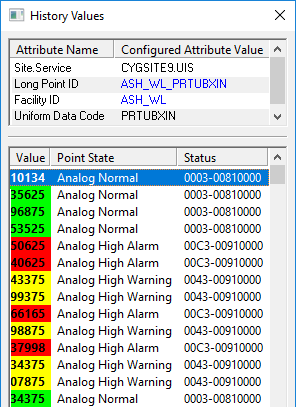
The Point Status is a hexadecimal representation of the Status Bits set, one value for each the Base Status Bits and the Extended Status Bits in the format BaseStatus-UserStatus. The hexadecimal representation is shown in the Status column in the History Values dialog box, as shown in the following image.
|
Click the thumbnail to see |

Point State
Point States are defined in the Point Scheme definition in the CvsMetadata.xml file. A Point State may be the result of a single Status Bit being set, or a combination of Status Bits being set. A point can be in a Normal state even when multiple Status Bits are set, as shown in the following image:
|
Click the thumbnail to see |
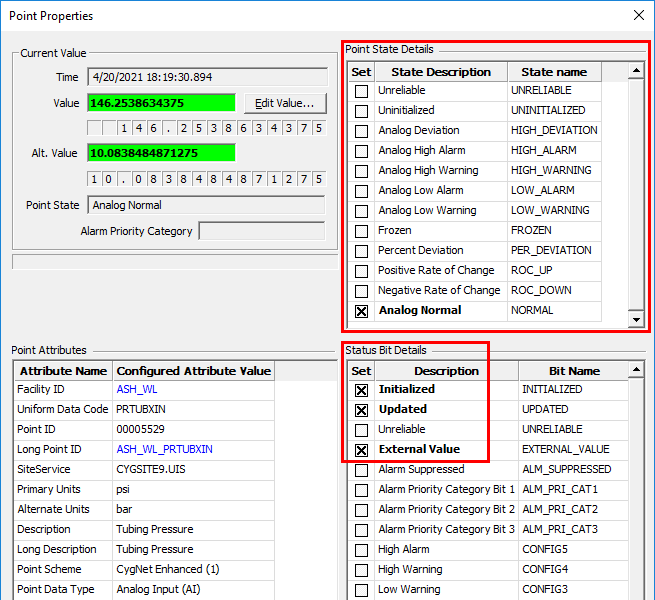
If multiple bits are set resulting in multiple Point States, the highest precedence state will show as the point's state:
|
Highest Precedence Point State |
Alarm Condition
As described previously, the Point State definitions include many characteristics related to how the current values are displayed to the user in various CygNet user interfaces. For example, based on the Alarm Priority Category value encoded in Extended Status Bits 20-22, the user may want to change the Foreground and Background colors displayed by a Text control on a CygNet HMI application screen (Canvas and CygNet Studio). However, many of these display variations have nothing to do with why a point is determined to be in an alarm state. So, in order to derive the underlying alarm characteristics from the unrelated display properties of a resolved Point State, the concept of a highest precedence Alarm Condition exists. Simply put, Alarm Conditions are Point States defined in the Point Scheme that have been flagged with alarmcondition="true".
For example, the following table shows a custom Point Scheme for Analog Point Types.
| Alarm Priority Categories | |||||||||
|---|---|---|---|---|---|---|---|---|---|
| Point State | Alarm Cond | High | Medium | Low | Low | ||||
| High Out-of-Range | 1234.56 ^ | 1234.56 ^ | 1234.56 ^ | 1234.56 ^ | 1234.56 ^ | ||||
| Low Out-of-Range | 1234.56 v | 1234.56 v | 1234.56 v | 1234.56 v | 1234.56 v | ||||
| Limit Alarm | 1234.56 L | 1234.56 L | 1234.56 L | 1234.56 L | 1234.56 L | ||||
| Rate of Change | 1234.56 | 1234.56 | 1234.56 | 1234.56 | 1234.56 | ||||
| In progress | n/a | 1234.56 P | 1234.56 P | 1234.56 P | 1234.56 P | ||||
| Manual Mode | n/a | 1234.56 M | 1234.56 M | 1234.56 M | 1234.56 M | ||||
| Off Scan | n/a | 1234.56 O | 1234.56 O | 1234.56 O | 1234.56 O | ||||
| Error | 1234.56 E | 1234.56 E | 1234.56 E | 1234.56 E | 1234.56 E | ||||
| Unverified/Questionable | n/a | 1234.56 ? | 1234.56 ? | 1234.56 ? | 1234.56 ? | ||||
In this example, each non 'n/a' cell represents a distinct Point State and the cells in the Alarm Cond column represent those Point States that have been flagged as Alarm Conditions.
Controls on Canvas and CygNet Studio screens allow you to determine the display properties of a current value based upon either its highest-precedence Point State or its highest-precedence Alarm Condition. In the above example, when a Rate of Change alarm is calculation by the CVS and the Alarm Priority value assigned to the configurable bit definition puts it in the 'High' Alarm Priority Category, the Point State description displayed to the user would be 'Rate of Change (high)' and the text would be colored RED. However, if the control was configured to display the Alarm Condition, the description displayed to the user would be simply 'Rate of Change' and the text would be colored GREEN.
You could also add a column the Current Alarm List that reports the highest-precedence Alarm Conditions for all displayed current alarms.
While a value update may result in the configurable Status Bits being set, an alarm record will not be created unless the point record has enabled reporting it to the CAS. This is also true for reporting the alarm condition to the General Notification Service (GNS).
|
Calculate and Report to CAS and GNS |

In the previous example, since the Unverified/Questionable Point State does not resolve to an Alarm Condition, the two configurable Status Bits used to calculate this Point State (named 'Not Verified' and 'Questionable') should never be configured to report to the CAS.
|
Unverified/Questionable Point State |

The attributes of each configurable Status Bit are defined in the Point Scheme per the Point Type. These configurable Status Bits are listed in the point's configuration record, and each can be enabled or disabled for calculation by the CVS.
|
Click the thumbnail to see |
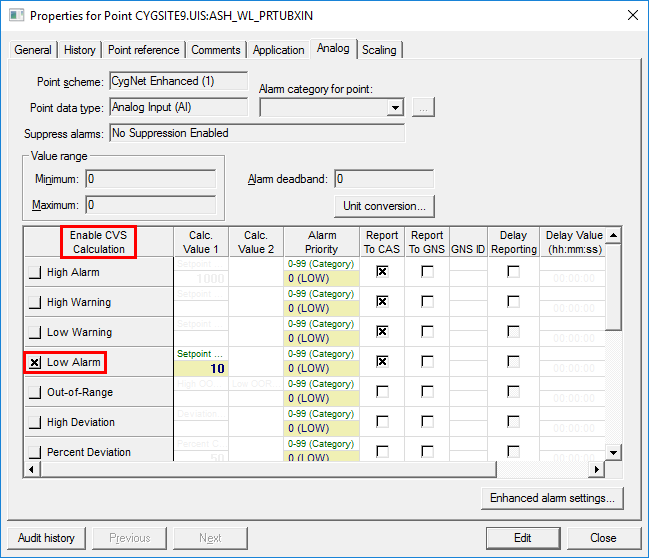
If CVS Calculation is enabled for a configurable Status Bit, the bit(s) associated with the alarm for that point cannot be externally toggled (manually or via script). This is because the CVS has control over the bit(s). For example, if the 'Low Alarm' status bit is enabled (as in the above example) and you attempt to toggle the bit using a CxScript.GlobalFunctions.SetPointEx2 function, the system will ignore the request.
Point Scheme
A CygNet Point Scheme defines how the Status Bits in the real-time record resolve to Point States, as well as defining the Point State precedence, the Point State colors, and the Alarm Priority Categories, etc.
The definition of a Point Scheme is contained in a file named CvsMetadata.xml file, which is stored in the ARS folder. CygNet supports up to 16 Point Schemes.
The default Point Scheme is the CygNet Standard Point Scheme. It is identified as Scheme 0 and the definition for this Point Scheme cannot be modified. If you define a Scheme 0 in the CvsMetadata.xml file the system will ignore it and will default back to the system's definition of Scheme 0.
The CvsMetadata.xml file can contain definitions for up to 15 additional Point Schemes, each being identified by an ID number (1-15) and a description.
The CygNet Enhanced Point Scheme, which is used by CygNet for Production, is identified as Scheme 1. This Point Scheme can be modified.
For a Point Scheme to be available as an option for a point, its definition must be included in the CvsMetadata.xml file. If a system has more than one Point Scheme defined, you can select the Point Scheme to apply to a point using the Point scheme property field in the point configuration record.
|
Point Scheme Configuration |
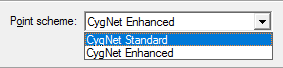
If you want the CygNet Standard to be available as a Point Scheme property, in addition to other Point Schemes defined in the CvsMetadata.xml file, you must include the <CygNetStandardMetadata/> element as the first line in the <CvsMetadataDefinition> element as shown below.
|
CvsMetadata.xml |
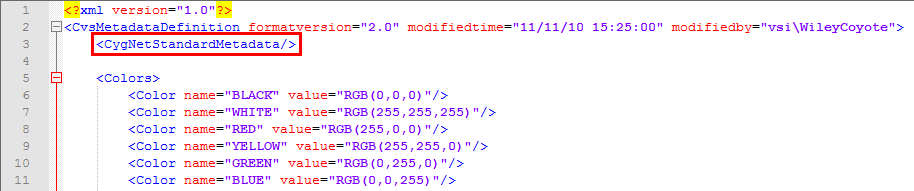
If this line is not present in the CvsMetadata.xml file, then the CygNet Standard will not appear as an option in the Point scheme property in the point configuration record.
Note:If you change the Point Scheme of an existing point, CygNet will revert the point to an Uninitialized Point State and the delete the old Point States from all records.


