Configuring Zones
Use the Zone page of the CygNet Redundancy Editor to configure a set of redundant RSMs that belong to the same zone. In a redundancy environment a zone represents one or more servers running one or more redundant RSMs all operating on the same domain. A zone can be a single server, but it may also represent multiple servers running one or more sites that can be part of a redundant relationship.
|
Click the thumbnail to see an |
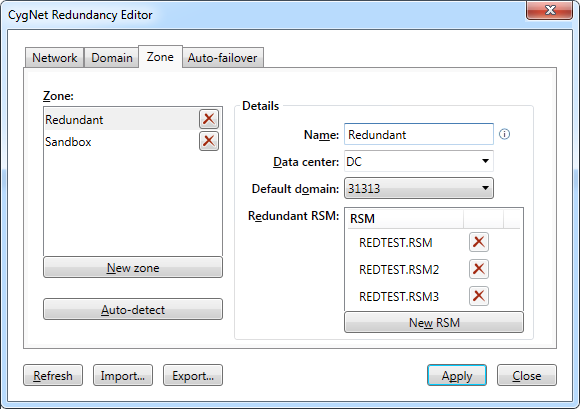
Zone Properties
The following table lists and describes the Zone page properties.
| Parameter | Description |
|---|---|
| Zone | |
|
New zone |
Click New zone to configure a new zone in your redundancy environment. Click X to remove the associated row. |
|
Auto-detect |
Click Auto-detect to retrieve all RSMs on the specified default domain. Note: Auto-detect will clear any existing host definitions and retrieve all RSMs for each listed domain. |
| Details | |
|
Name |
Specify a unique name for the zone (20 characters or less). |
|
Data center |
Select or type the data center to which this zone belongs, for example, Houston data center, or Oklahoma data center, etc. If you are adding multiple zones to the same data center, you can select the data center from the drop-down menu instead of retyping it. Note: All unique data centers need to have identical spelling and capitalization. No more than two data centers can be defined. |
|
Default domain |
Select the domain to which this zone defaults. During a failover event, this zone may switch to run on a different domain. |
|
Redundant RSM |
Specify all the RSMs that are part of this zone. There are two ways you can populate this list:
Click X to remove any row. Notes: If you have multiple RSMs for any one site, each RSM needs to have a unique service name. Best practice recommends incorporating the server name into the RSM service name to help align RSMs with the hardware on which they are running. If an RSM in a default domain is not redundant, it should not appear in this list. |


