HyperPoint Scripting Examples
Summation
The following procedure explains how to create a summation point. Four points are created: two addend points, a point to store the sum, and a HyperPoint to compute the sum.
Creating a Summation Point
- Open CygNet Explorer and navigate to the Point Service.
- Right-click in the service pane and click New to create a new point.
- Choose your site and UIS service, and enter "POINT1" for the Long Point ID.
- Click OK to save the new point.
- Repeat steps 2-4 two more times, naming the new points "POINT2" and "SUM."
- Right-click again in the service pane and click New to make one more point.
- Fill in the site name and HSS service, and enter "SUM_CALC" for the Long Point ID. Click the HyperPoint check box to indicate that it is a HyperPoint. Select "String Input" for the Point Type.
- Click the HyperPoint page, which should now be visible. Click the Edit button to open the script editor.
- Select SUM_CALC from the Object drop-down menu to view the events in the Event drop-down menu. Enter the following script, noting the use of the OnInitializeEx and OnPointChange events. Be sure to replace occurrences of CYGDEMO with your own site name.
Sub SUM_CALC_OnInitializeEx(This)
SUM_CALC.Value = "Initialized"
'Identify the set of points to monitor
Points.AddPoint "CYGDEMO.UIS:POINT1", This
Points.AddPoint "CYGDEMO.UIS:POINT2", This
End Sub
Sub SUM_CALC_OnPointChange(This,Tag)
This.Value = "Updated"
'Get Point objects
Set P1 = Points.Point("CYGDEMO.UIS:POINT1")
Set P2 = Points.Point("CYGDEMO.UIS:POINT2")
'Check validity of values
If Not (IsNumeric(P1.Value) And IsNumeric(P2.Value)) Then
This.Value = "Non-numeric vals"
Exit Sub
End If
'Calculate sum and save to point, SUM
sum = CDbl(P1.Value) + CDbl(P2.Value)
SetPoint "CYGDEMO.UIS:SUM", sum
End Sub- On the General page , check Activate Script. Click OK to close the dialog box.
- Navigate to the Universal Interface Service, Current Values page.
- Double-click POINT1 to open its point properties.
- Click Edit Value and enter a new value of 5. Click OK, then click Close to return to the service pane.
- Repeat steps 12-13 for POINT2, entering a value of 10.
The value of SUM should be 15 as expected. This value can be verified using CygNet Explorer.
Deviation
This example demonstrates the use of system HyperPoints to calculate a deviation. The HyperPoint, SYSTEM_DELTA_CODE, is created to compute the deviation of a point’s values over the last hour. MYPOINT_DELTA_CALC is the HyperPoint associated with MYPOINT (the point whose value will be calculated). This HyperPoint can be used as a template for other points’ delta calculations, as well. MYPOINT_DELTA_CALC has added the SYSTEM_DELTA_TRIGGER point to its Points object, which updates every minute. This in turn triggers the MYPOINT_DELTA_CALC OnTimer event to run every minute, which calls the SYSTEM_DELTA_CODE Calculate method. The Calculate method stores the actual delta value back to the MYPOINT_DELTA UIS point. Calculation is performed using the VHS Rollup Iterator object.
The following diagram shows the flow of data for these points and their respective services. This setup is typical of system HyperPoints. Code is provided below for the HSS points.
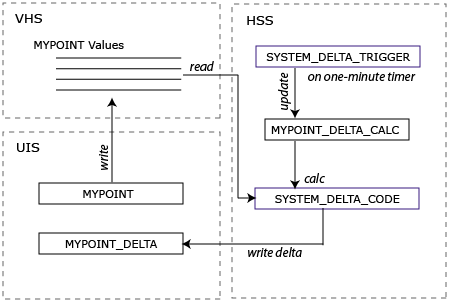
|
| Deviation Data Flow |
SYSTEM_DELTA_CODE
This HyperPoint Script includes a global method, Compute, which accepts as parameters the HyperPoint object of the calculation point and the target point for the calculation.
'(Declarations)
'Global VHS objects for rollups
Dim g_vhsRollupIterator
Dim g_vhsHistEntry
'End of (Declarations)
Sub SYSTEM_DELTA_CODE_Compute(hPoint, strTargetTag)
On Error Resume Next
Dim strSourceTag, strVhs
Dim dateFirst, dateLast
Dim dDelta
Err.Clear
'Create VHS objects if not already created
If Not IsObject(g_vhsRollupIterator) Then
Set g_vhsRollupIterator = CreateObject("CxVhsLib.RollupIterator")
End If
If Not IsObject(g_vhsHistEntry) Then
Set g_vhsHistEntry = CreateObject("CxVhsLib.HistoryEntryEx")
End If
'Check that objects were successfully created
If Err.Number <> 0 Then
hPoint.Value = "Failed iter init"
Exit Sub
End If
'Get the VHS Site.Service and the source tag string
strVhs = hPoint.GetAttribute("General1")
strSourceTag = hPoint.GetAttribute("General2")
'Set the date range to the previous hour
dateLast = Now
dateFirst = DateAdd("h", -1, dateLast)
'Set up iterator (rollupCalcDelta=5, rollupUnitHours=2)
If (g_vhsRollupIterator.Initialize(strVhs, strSourceTag, dateFirst,dateLast, 5, 2, 1, 0) = False) Then
hPoint.Value = "Failed iter init"
Exit Sub
End If
g_vhsRollupIterator.MoveFirst()
dDelta = 0
'Loop to the last returned value in the iterator
While (g_vhsRollupIterator.GetForward(g_vhsHistEntry) <> False)
If IsNumeric(g_vhsHistEntry.Value) Then
dDelta = CDbl(g_vhsHistEntry.Value)
End If
Wend
'Set the target point to the delta value and update point status
SetPoint strTargetTag, dDelta, Now, 0
hPoint.Value = "Succeeded"
End SubMYPOINT_DELTA_CALC
This is the calculation point in the HSS that is associated with MYPOINT.
On the Application page of the point’s properties, the following fields must be defined:
General Data Field 1: the VHS Site.Service (i.e. FOGRIDGE.VHS)
General Data Field 2: the source point long ID (i.e. FOGRIDGE.UIS:MYPOINT)
Sub MYPOINT_DELTA_CALC_OnInitializeEx(This)
'Add the trigger tag to the Points object
Points.AddPoint "FOGRIDGE.HSS:SYSTEM_DELTA_TRIGGER;TIMESTAMP",This
End Sub
Sub MYPOINT_DELTA_CALC_OnPointChange(This,Tag)
'Compute the delta and save to the MYPOINT_DELTA point
SYSTEM_DELTA_CODE_Compute This, "FOGRIDGE.UIS:MYPOINT_DELTA"
End SubSYSTEM_DELTA_TRIGGER
The point that triggers the OnTimer event to be called for all points that have SYSTEM_DELTA_TRIGGER added to the Points object (such as MYPOINT_DELTA_CALC).
Sub SYSTEM_DELTA_TRIGGER_OnInitializeEx(This)
'Set the timer to a one-minute interval
Timer.Set This, 60000
End Sub
Sub SYSTEM_DELTA_TRIGGER_OnTimer(This)
'Update the timestamp to force update of
'dependent HyperPoints
This.Timestamp = Now
End Sub

