FMS Component-Level Security
FMS component-level security can optionally be applied at the Node level within the CygNet Measurement application. Node security can be administrative, operational, or both. Administrative security governs who can access a CygNet Measurement record. Operational security governs who can perform certain operations on records for the specified Node within the CygNet Measurement system. Operational security can be applied only to records for which the type is "Event."
Apply FMS component-level security to FMS Nodes for the following purposes.
- Allow a user or group of users to access or edit certain Node records without being able to access other Node records
- Allow a user or group of users to perform certain actions against specified Nodes without being able to do so for other Nodes or for other actions
Configuring FMS Component-Level Security
For Nodes where specific permissions are desired, configure a Node-level security application, either at Node creation or later, by specifying a Security application value in the Node properties.
You need at least Level 3 authorization for the FMS service's NODE event to create Nodes. You need at least Level 2 authorization for the FMS service's NODE event to update Node properties. See FMS Security (and NODE security event) for more information.
|
Security application that governs node-level security |
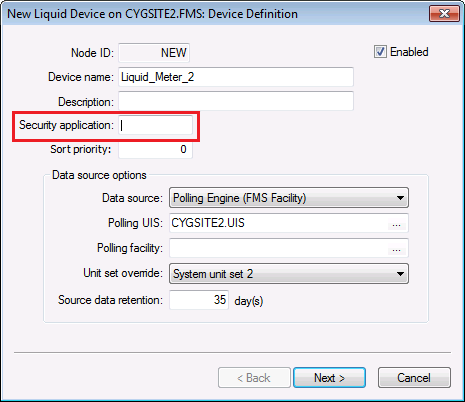
To Configure FMS Node Security when Creating a Node
See Creating CygNet Measurement Nodes and Using the Nodes Menu in the CygNet Measurement section for more information about configuring component-level security during FMS Node creation.
To Configure FMS Node Security by Updating Node Properties
- In the ACS, create an Application and Event for the FMS Node, and define permissions required for the Event.
- In the FMS, right-click on the Node and click View Node Properties.
- Assign a security application for the Node as follows. See FMS Security Applications for more information.
- For a device Node, on the Device Properties page, enter a value for the Security application.
- For a group Node, on the Group Definition page, enter a value for the Security application.
- Click OK to save the change to the Node security application property.


