Permissions
Permissions are assigned to Events. They are based on a user ID and an authorization level for that ID.
User Authentication
CygNet does not have its own logon. User authentication is performed by the operating system (Microsoft Windows) when a user logs on to the network.
User ID Types
The ACS supports three types of user IDs: User ID, CygNet Group ID, and Active Directory ID.
| Permission Type | Description |
|---|---|
|
US - User |
An ID representing a Microsoft Windows log on. It can represent a single user, or if wildcards are used, multiple users. If the domain is not specified it is an implied wildcard. |
|
CG - CygNet Group |
A collection of User IDs or Active Domain IDs. It can also contain references to other CygNet Groups. |
|
AD - Active Directory |
A Microsoft Active Directory user or Active Directory group. |
User ID
A User ID is a Microsoft Windows logon ID. The ID can be a specific user’s logon, or it can include wildcards ("*" and "?"). The table below shows examples of user IDs.
| Example User ID | Description |
|---|---|
|
Acme\ZPD1 |
Fully qualified ID. The ZPD1 logon on the Acme domain. |
|
Acme*\Cole.Davis |
Wildcarded ID. A "Cole.Davis" logon on any domain that starts with "Acme" (Acme1, AcmeNorth). |
|
Dan.Sanders |
Wildcarded ID. A "Dan.Sanders" logon on any domain. Since the domain is not specified it is wildcarded. This ID is the same as *\Dan.Sanders. |
|
J???.Jones |
Wildcarded ID. A logon that starts with "J" and has three additional characters (John, Jade, Jack, Jill) followed by ".Jones" on any domain. This is the same as *\J???.Jones. |
|
Acme\B*.Bonds |
Wildcarded ID. A logon that starts with "B" followed by ".Bonds" (Barry.Bonds, Bail.Bonds, Bobby.Bonds) from the Acme domain. |
|
Acme\* |
Wildcarded ID. Any login on the Acme domain. |
|
* |
Wildcarded ID. Any logon on any domain. Since the domain is not specified it is wildcarded. This is the same as *\*. |
|
UIS |
When service-to-service tasks are performed, such as the UIS setting an alarm in the CAS, security is verified in the same fashion as if a user with a Microsoft Windows logon were performing the task. Each service has a "user ID" that is specified in its configuration file. |
CygNet Group ID
A CygNet Group ID is a reference to a CygNet security group. A security group is defined and stored in the ACS and can be composed of Microsoft Windows logon IDs, Active Directory IDs, and references to other CygNet Groups.
The screen shot below shows two CygNet Groups: "ADMIN" and "SCADA_TEAM." The ADMIN group is composed of an Active Directory group, the SCADA_TEAM group, and a user. The SCADA_TEAM group is composed of three users.
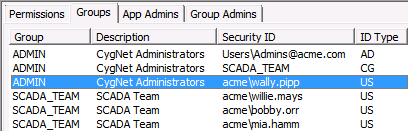
|
| Example CygNet Groups |
Note that an ID Type of "CG" cannot contain a wildcard.
The steps for adding a CygNet Group are outlined in the section Managing the ACS.
Active Directory ID
An Active Directory ID represents a Microsoft Active Directory user or Active Directory group. Defining a Microsoft Active Directory user or group is outside the scope of CygNet.
When specifying an Active Directory ID you must include the container name. The domain name is optional; if not specified, it will default to the domain which the host server resides. Be aware that in CygNet, Active Directory IDs are limited to 64 characters. See Using Active Directory with ACS for more information.
- ActiveDirectoryContainer\GroupID@DomainName.dom
- ActiveDirectoryContainer\GroupID
- ActiveDirectoryContainer\UserID@DomainName.dom
- ActiveDirectoryContainer\UserID
The table below shows examples of Active Directory IDs.
| Example Active Directory Group ID | Description |
|---|---|
|
Active Directory User |
Users\michael.jordan@acme.dom |
|
Active Directory Group |
Users\Admins@acme.dom |
Authorization Levels
Users can perform tasks in the system based on their authorization level for the Event that governs the task. See Security Reference for a list of the Events for each Application and the authorization level required to perform a task.
The ACS has six authorization levels, 0 through 5. These levels are hierarchical, with Level 5 being the highest. This means that if a user has Level 5 authorization, the user can perform any of the tasks that require a lesser authorization level.
For example, the CAS has an Event named ACK. This event governs alarm acknowledgment and requires Level 2 authorization. If a user has Level 4 authorization, the user will be able to acknowledge alarms because Level 4 is a higher level of authorization than required. Conversely, if a user has Level 1 authorization the user will not be able to acknowledge alarms because Level 1 is less than the required level.
For legacy purposes, the levels are identified in the ACS with a number and word. However, you should focus on the number.
0-None
1-Read
2-Update
3-Add
4-Delete
5-Admin
No one user has overall authorization. All users must be assigned authorization in the ACS for the various Applications and Events.
Service Administrative Authorization
A user has Service Administrative Authorization when the user has Level 5 (Admin) authorization for a service’s main security event. This level of authorization overrides authorization for all security Events for the service except ODBC and all records in the service, including those to which an Application Override applies.
|
Service Administrative Authorization |
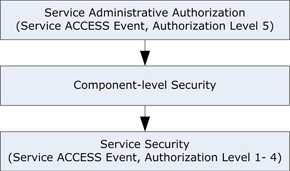
The Level 5 authorization as it applies to each service is described in the Security Reference section.
Multiple Matches for a User ID
The ACS resolves security by compiling a list of all users for each Application and Event. (CygNet Groups and Active Directory groups are resolved down to the user level.)
Due to the use of wildcards and groups, the list may include more than one reference to a user. In such cases the following rules apply:
- Fully qualified ID — a fully qualified ID takes precedence over a wildcard ID. A fully qualified ID is one that contains no wildcards.
- Highest level of security — The ID with the highest level of security takes precedence (Level 5 being the highest).


