CygNet ServiceMon Administration Utility
The CygNet ServiceMon Administration utility is provided for creating Service Monitoring Service (SVCMON) points. SVCMON points can be configured to report alarms, history, and notifications and are stored in the point record (PNT). See Service Monitoring Points for more information.
The CygNet ServiceMon Administration utility file is stored in the CygNet\Utilities directory (SvcmonAdmin.exe) on the host server.
Starting ServiceMon Administration
Installing and Launching
To install and launch (start) the application or utility using version management:
- Use CygNet Client Installer to install and launch the application. Once installed you can use CygNet Client Installer to start the application.
-OR-
- If previously installed, click Start > All Programs > CygNet > <name of the application or utility> or double-click the desktop shortcut.
Alternatively, browse to the CygNet\Utilities directory using Windows Explorer and double-click the program icon. You can also start an application or utility from a command line. These methods do not provide version management.
The CygNet ServiceMon Administration dialog box appears.
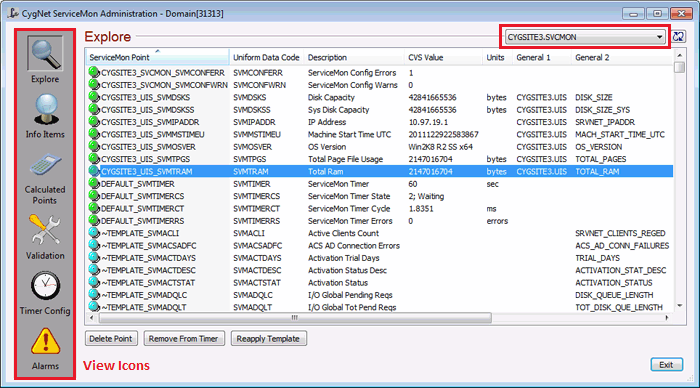
When you open the utility it connects to a SVCMON service. The name of the service is shown in the upper right-hand corner of the application. To change services, select the desired service from the drop-down menu. Click Refresh to refresh the displayed data.
|
CygNet ServiceMon Administration |
User Interface
The CygNet ServiceMon Administration utility has six views:
- Explore — displays all of the SVCMON tags in the Point Service. This is the default view.
- Info Items — the interface for creating new SVCMON points from system Info Items.
- Calculated Points — the interface for creating calculated SVCMON points.
- Validation — the interface for validating SVCMON points and SVCMON system UDCs.
- Timer Config — the interface for adding and configuring timers.
- Alarms — the interface for viewing SVCMON points that are in an alarm state.
To select a view, click the desired view icon.
Using the Utility
Use of the CygNet ServiceMon Administration utility depends upon your task. When using the utility for the first time you generally will:
- Validate SVCMON.
- Create SVCMON points.
- Create timers and assign SVCMON points to the timers.
- Create SVCMON calculated points.
Opening the Utility
To start the utility, open CygNet Client Installer, find the utility in the UTILS folder, and click Launch. Or start the utility from the desktop shortcut.
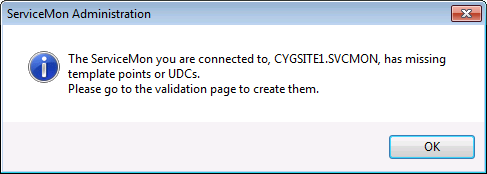
If your SVCMON service is new, the following message will be displayed the first time the CygNet ServiceMon Administration utility is used. This is due to the fact that the service does not have a default timer, point template, or the SVCMON UDCs have not yet been added to the Table Reference Service. Validating the service will resolve these issues.
If the message is displayed on subsequent uses of the utility it is generally due to configuration errors. Validation generally can be used to resolve these errors as well.
Additionally you may see this message if you have updated your system and the ServiceMon Administration utility knows about new info items that were not previously available.
|
ServiceMon Administration message |
The utility will persist to the most recent SVCMON used. In the example above, the most recent service was CYGSITE3.SVCMON. You can change services once the utility is opened.
The utility also supports the /domain:nnnn command-line parameter to start on a domain other than the default domain. See Cross Domain Support.
More:


