Current Value Services
A Current Value Service (CVS) is a generic name for a data collection service that acquires data using data collectors, EIEs, remote devices, and communication devices, and stores the data in an internal table called a current value table.
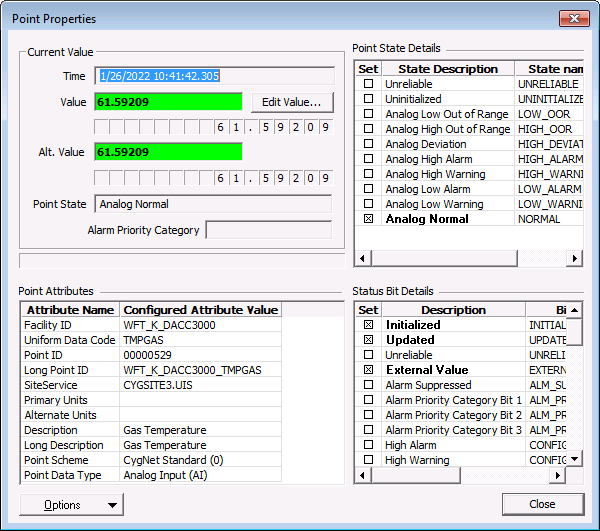
When a point is added to CygNet, one of its properties is its service; specifically, its current value service. Once the point is committed to the system, it is added to its CVS’s current value table. Each point has one real-time record in the current value table. The real-time record shows the current value, the timestamp of the value, and the status of the value (alarm bits, status bits, etc.)
A CVS also caches point configuration information, including history, alarm, and notification reporting options. When a point’s real-time record is updated, the CVS updates the point’s real-time record and, if necessary based on the point configuration, reports the record to the Value History Service (VHS), Common Alarm Service (CAS), and the General Notification Service (GNS).
The Current Value services in CygNet Software are listed in the following table.
| Service | Description | Function | Maximum Points |
|---|---|---|---|
|
HyperPoint Scripting Service |
The HSS is a CygNet real-time service that executes and processes custom scripts. |
500,000 | |
|
OPC Interface Service |
The OPCIS is a specialized CygNet CVS that provides connectivity to an OPC server. |
500,000 | |
|
Service Monitor Service |
The SVCMON is a specialized CVS that provides a method to monitor system, service, and site statistics. |
500,000 | |
|
Universal Interface Service |
The UIS is the primary interface between field devices and CygNet devices. |
|
Maximum Point Limit
The MAX_POINTS keyword in the service configuration file defines the maximum number of points in the current value service and can be set to a value between 100 and 500,000*. See the MAX_POINTS keyword in the service configuration file: HSS, OPCIS, SVCMON, and UIS for more information.
The maximum point limit for the HSS, OPCIS, SVCMON, and the 32-bit UIS is 500,000 points. *The 64-bit UIS has a maximum point limit of 5,000,000 points.
If a value outside the allowed value limits is specified for the MAX_POINTS keyword, the maximum number of points will default to the value limits. For example:
- if a user specifies a value less than 100, the maximum number of points will default to 100 for any CVS
- if a user specifies a value more than 500,000, the maximum number of points will default to 500,000 for any 32-bit CVS
- if a user specifies a value more than 5,000,000, the maximum number of points will default to 5,000,000 for a 64-bit UIS
Note: Best practice recommends running any CVS with more than 256,000 points on a 64-bit operating system so that adequate memory is available to accommodate 500,000 points (or up to 5,000,000 points on a 64-bit UIS).
Note: For a 64-bit UIS, if using more than 500,000 points, ensure that the system has sufficient CPU and memory when designating the maximum point limit, as too many points can severely impact a system's performance.
Viewing a Real-Time Record
Real-time records can be viewed using any client application that provides an option to access the properties of a CVS record. In CygNet Explorer, right-click on the record in the CVS and click Point Properties to display the property page.
|
Point Properties |
Data Persistence
Real-time records are stored in memory, so the values are cleared when the service is stopped. However, a CVS can be configured to "persist" values. When this option is enabled, the service writes the values to disk as well as memory. The file is named CVS.Persist.dat and is located in the service folder.
CVS Service Files
| File Name | Description |
|---|---|
|
CVS.Persist.dat |
This file contains persisted values used to populate the CVS on startup when the PERSIST_VALUES service configuration keyword is enabled. The file is written according to PERSIST_FILE_REFRESH_RATE service configuration keyword. |
|
CVS.Persist.bak |
Backup copy of CVS.Persist.dat. |
|
PendingAlarms.dat |
This file contains pending alarms to be sent to the CAS. The file is written at CVS shutdown in addition to the rate specified by the service configuration file keyword NOTIFICATIONS_PERSIST_RATE. |
|
AlarmSuppression.dat |
This file contains information about suppressed alarms that were still suppressed when the service was shutdown. The file is written at CVS shutdown in addition to the rate specified by the service configuration file keyword NOTIFICATIONS_PERSIST_RATE. |
|
DisplayedAlarms.dat |
This file contains alarms that have delayed reporting to the CAS or GNS. The file is written at CVS shutdown in addition to the rate specified by the service configuration file keyword NOTIFICATIONS_PERSIST_RATE. |
|
PendingNotifs.dat |
This file contains pending alarms to be sent to the GNS. The file is written at CVS shutdown in addition to the rate specified by the service configuration file keyword NOTIFICATIONS_PERSIST_RATE. |
Each point can be configured as to how it uses its persisted value when the CVS is restarted. This is configured in the Initial value type property in the point configuration record. A blank value is a null value. See PNT Editor - General Page for more information.
The Initial value type property specifies the type for the point's initial value.
- None — The point starts up with a blank (null) value. No initial value. (N)
- Restore — If the point's CVS is configured to persist values (PERSIST_VALUES keyword is enabled), then the service will use the value from the CVS.Persist.dat. If the service is not configured to persist values, the point will start with the value specified in the Initial value property in the point configuration record. (R)
- Service Configuration — If the point's CVS is configured to persist values (PERSIST_VALUES keyword is enabled), then the service will persist the point's last known value when the service starts. If the service is not configured to persist values, the point will start with a blank value. (D)
- Specified Value — The point starts up with the value specified in the Initial value property in the point configuration record. (I)
CVS Scripting
The following scripting option is available for data interface functions related to the Common Value Services.
| COM API | Description and Link |
|---|---|
|
CxCvs |
The CxCvs is the standard library for Current Value Services (CVS)-related objects. See CxCvs for more information. |
More:
 HyperPoint Scripting Service (HSS)
Service Monitoring Service (SVCMON)
Universal Interface Service (UIS)


