Split Service Directories
If you choose to configure your CygNet Services to use split directories, the service executable file (<servicename>.exe) and any dependent dynamic-link library files (<name>.dll) are located in one directory (the executable directory) and the service configuration file (<servicename>.cfg) and data files (<servicename>.ddl, .dat, .inx, .ts) are located in a different directory (the data directory).
Note: The GNS has several dependencies. Make sure all .exe and .dll files are located in the executable directory.
If the directories are on different drives, you must be aware of the drive configuration to ensure that your configuration is supported. Mapped drives and Universal Naming Convention (UNC) connections are not supported, whether the drive is a SAN, NAS, or directly attached. This is due to performance issues that can arise with mapped and UNC connections, such as timeouts, bottlenecks during peak network usages, outages during disconnects, and user authentication, etc.
Supported Configuration
The following diagram represents the preferred network configuration for split directories.
|
Preferred network configuration |
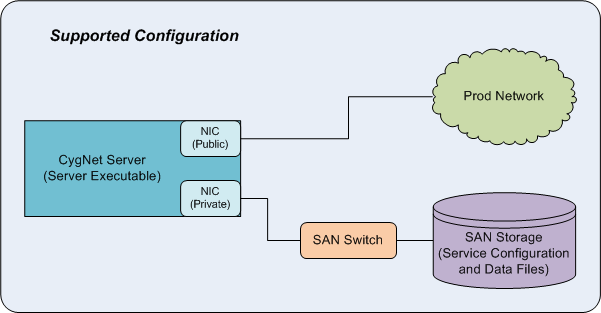
In this configuration, the SAN drive is directly attached to the CygNet server using iSCSI with a dedicated private NIC (or an HBA card for Fiber Channel). This mounts or presents the drive and letter before the server operating system is up and running. The drive is recognized as another physical drive on the CygNet server.
Non-supported Configuration
The following diagram represents a non-standard network configuration and is not supported for split directories.
|
Non-supported network configuration |
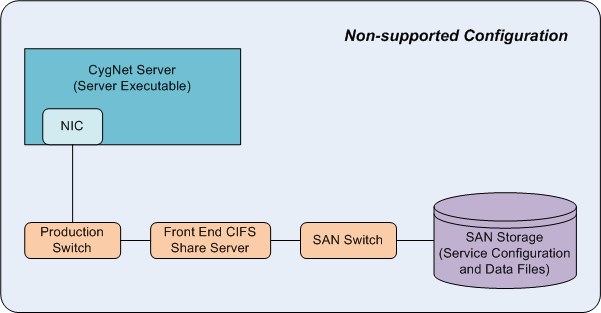
In this configuration, the CygNet service executable is running on the CygNet server. The data files directory is on a SAN drive. The SAN drive is recognized as a "mapped" drive to the CygNet server via a front-end CIFS share (usually a Windows server). This configuration is not supported.
Start Split Services from Command Line
In a system where the executable files are located in C:\CygNet\Services and the data files are located in E:\CygNet\Data\ restart any service using the following command line:
|
C:\> start /D [path to config]ars.exe |
for example:
|
C:\> start /D e:\cygnet\data\ars c:\cygnet\services\ars\ars.exe |
Alternatively you can start the service from the data directory using the following command:
|
E:\CygNet\Data\> c:\cygnet\services\ars\ars.exe |


