Uniform Data Codes
Uniform Data Codes (UDCs or data codes) are CygNet’s version of uniform product codes. They represent individual pieces of data in the system and can be used as a method for standardizing data identification. UDCs are a common collection of points within a system and are stored in the Table Reference Service (TRS). For example, commonly used UDCs include PSTATIC for Static Pressure, PDIFF for Differential Pressure, TGAS for Gas Temperature, and VBATT for Battery Voltage.
CygNet resolves data based on facility-UDC mapping. The combination of a facility and a UDC creates a unique point within the system. The combination of the facility and the UDC is stored in the Point Service (PNT).
Tags can be identified by facility-UDC throughout CygNet (for instance, in CygNet Studio screens, reports, and alarm filtering). Facility-UDC identification is required for templating. When using templates, tags for device specific data (for example, board temperature or voltage) need to be created for each facility for device UDCs, in order for these points to show on a templated screen. Keep the use of UDCs consistent within a host, and from host to host. It is critical to devise a consistent naming convention for all UDCs to avoid confusion. For example, PSTATIC is always PSTATIC regardless of facility.
|
Uniform Data Code Assignment |
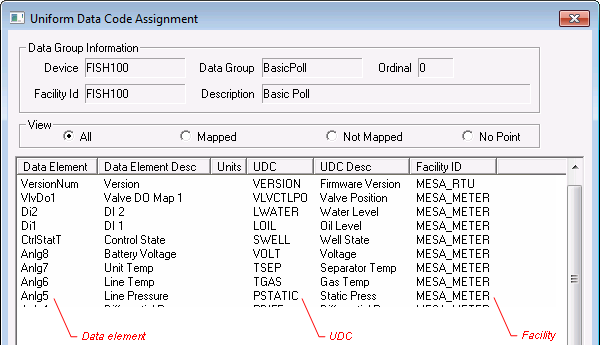
For sorting purposes, UDCs generally start with a letter that represents a category of UDC, followed by letters that represent the specific item. Samples of UDCs are shown below.
| UDC | Description |
|---|---|
| PSTATIC | Static Pressure |
| PDIFF | Differential Pressure |
| TGAS | Gas Temperature |
| VGT | Volume Gas Today |
| VGY | Volume Gas Yesterday |
| VBATT | Battery Voltage |
| VCHGR | Charger Voltage |
Keeping UDCs named consistently from device to device and, in a multi-host system, from host to host makes other tasks in the system easier, such as creating templates for human-machine interface (HMI) screens, building reports, and performing rollup calculations.
UDCs are stored in the Table Reference Service. A default set of UDCs are installed when the system is setup. You can use this set of data codes or create your own.
For the most part, you can modify the default UDC set as needed; however, some Equipment Interface Engines (EIEs) contain references to specific data codes. Do not modify these data codes or remove them from the system.
More:
 Setting Up 20 Minute Statistics


