Response List File (.rsp)
The .rsp has two functions: 1) it serves as the trigger for the Version Manager; and 2) it lists all of the files associated with an application.
Rsp File Name
The .rsp file must have the same prefix as the .app file.
Rsp File Format
The .rsp file is a text file. Each entry (file name) in the file must reside on its own line. The line includes the name of the group in which the file is stored in the BSS, the installation path, and any installation parameters. The installation path can be relative or absolute. Relative paths are relative to the installation location of the Version Manager.
The syntax of a line in the .rsp file is:
[BSSGROUP] Path\FileName [<INSTALLPARM>]
| RSP Line Component | Description |
|---|---|
|
[BSSGROUP] |
Square brackets contain the name of the application (group) in the BSS in which the file is stored. |
|
Path\FileName |
Path\FileName points to the folder on the local drive to where the file will be downloaded. A path can be relative or absolute. Relative paths are relative to the installation location of the CygNet Client Installer. |
|
[<INSTALLPARM>] |
Optional installation parameters. Parameter name must be in angle brackets. |
You can include comments in the .rsp file. Comment lines must begin with a pound (#) sign.
A sample .rsp file is shown below:
|
Sample .rsp file |
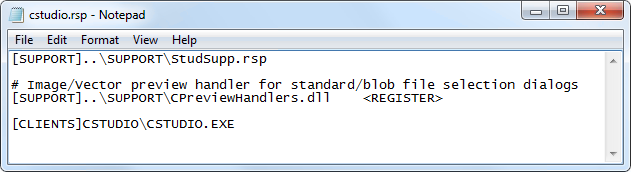
Notice that this file includes references to other .rsp files. When such references are included, the Version Manager will check the timestamps of those .rsp files against the BSS and, if necessary, perform version management on the files listed in each .rsp. You can daisy chain up to 20 .rsp files. Be careful not to define circular references when chaining .rsp files.
Icon File
An application icon file (.ico) is not specified in the .rsp file. However, it must be uploaded to the BSS in the same group and have the same file name prefix as the .exe. The .ico is automatically downloaded from the BSS when the application files are localized.


