Positions, Headers, and Sub-Headers
The Well Test module needs to maintain a cross-reference between the well identifier (as per the field device) and the well’s CygNet facility tag. In a single-MSV field configuration, this configuration is straight-forward to maintain. Field configurations with multiple MSVs may require additional information to keep things straight. This topic introduces some of the required elements in the well test configuration to help organize and maintain proper configuration, for a field configuration of either type.
Position
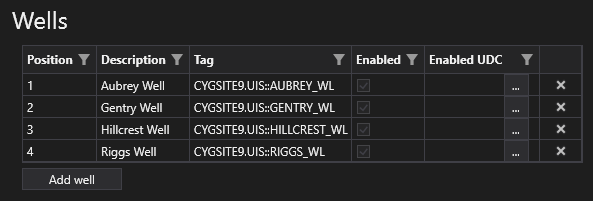
The Well Test module allows a cross-reference to the facility associated with a header and a header position. The position of a well in a header represents the unique integer that the remote device will return when the well is being tested. Unique positions are crucial in order to properly process the well test results to the appropriate well test facility.
In host-based configurations, the position identifier isn’t used as the host is controlling the test sequence and as such knows with which well to associate the well test results. However, in device-based configurations the only way the host knows how to process the results is to know which position was tested in order to look-up the associated CygNet well facility.
Positions are reflected in the Wells grid in the Headers page in the well test configuration, as shown below.
Note: Positions are only shown when the associated template is not configured to show headers.
|
Headers page, Wells grid, no sub-headers |
Sub-header and sub-header position
In field configurations that have multiple MSVs or other switching devices, the sub-header and sub-header position properties can be used to help operators understand the physical connection of the testing facility. These are informational-only properties, but they do provide insight into which ports are used and which ones are available.
Sub-headers and sub-header position properties are configured differently depending on the host mode:
- For host-based templates, the sub-header and sub-header position properties are configured and displayed in the Positions grid
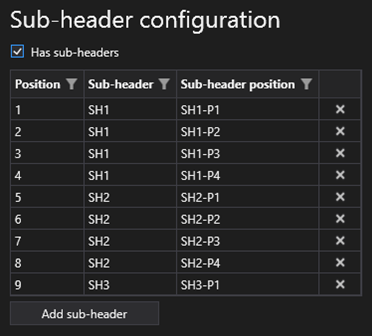
- For device-based templates, the position, sub-headers, and sub-header position properties are configured and displayed in the Sub-header configuration grid
Sub-header and sub-header position are configured (for device-based templates) in the Sub-header configuration grid on the Templates page in the well test configuration, as shown below:
|
Headers page, Wells grid, no sub-headers |
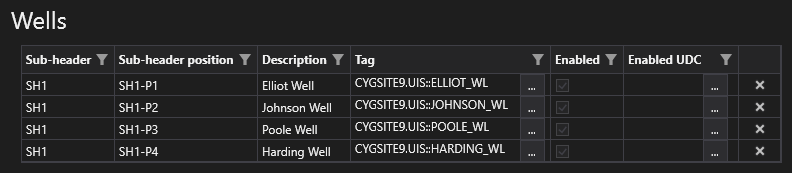
When a header is associated with a template that has sub-headers enabled, the Wells grid for the selected Header will reflect all the available unique sub-header and sub-header position combinations along with any configured wells, as shown below:
|
Headers page, Wells grid, Sub-header and Sub-header position |