Set Point Action Type
The Set Point (SetPoint) action type is used to issue a SetPoint to a CygNet point. This action can be used to provide status throughout the command sequence.
|
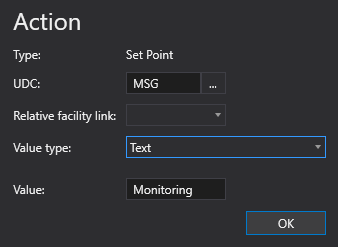
Set Point action > Text value type |
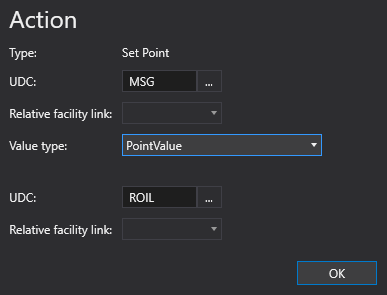
Set Point action > PointValue value type |
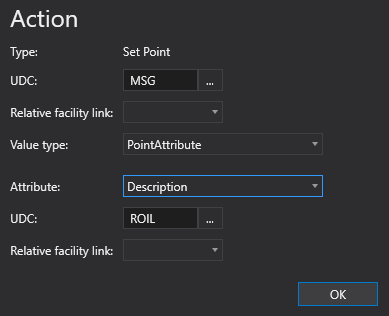
Set Point action > PointAttribute value type |
To configure a Set Point action
A Set Point action type can be configured from several different places within the well test configuration control. However, the base configuration is always the same. Perform the following steps to configure this type of action, referring to the property definitions below:
- Click to Add action from the drop-down menu.
- Select the Set Point action type from the Action type list. The action's properties will appear on the right.
- Click the browse button to open the Select UDC dialog box and select an appropriate UDC.
- Optional. Select a relative facility tag from the Relative facility link drop-down menu.
- Select a Value type from the drop-down menu. Options include None, Text, PointValue, PointAttribute, and FacilityAttribute.
- If a Text value type is selected, enter the text Value used in the action.
- If PointValue is selected, select a UDC from the Select UDC dialog box and select a relative facility tag from the Relative facility link drop-down menu.
- If PointAttribute is selected, select a point Attribute from the drop-down menu, select a UDC from the Select UDC dialog box, and select a relative facility tag from the Relative facility link drop-down menu.
- If FacilityAttribute is selected, select a facility Attribute from the drop-down menu, and select a relative facility tag from the Relative facility link drop-down menu.
- Click OK to accept the configuration.
Action Properties
The properties for the Set Point action type are described below.
| Property | Description | XML |
|---|---|---|
|
Type |
Specifies the action type for the action. |
|
|
UDC |
Specifies the UDC to use for the point. Click the browse button to open the Select UDC dialog box and select an appropriate UDC. |
|
|
Relative facility link |
Specifies the relative facility tag to use for the action. E.g., Separator Note: |
|
|
Value type |
Specifies the Value type (valueType). There are five possible values:
|
|
|
Value |
If the Value Type (valueType) is Text, then this field specifies the text used in the action. Does not appear/is not required if the Value Type (valueType) is None or Text. |
|
|
Attribute |
Specifies a value, a point attribute, or a facility attribute. If the Value Type (valueType) is PointAttribute or FacilityAttribute, then this field indicates which attribute will be used. The available values to use for this field can be found in the CygNet.API Help file under the CygNet.Data.Core > CygNetCoreProperties.CygNetProperty Enumeration section. |
|
|
UDC |
If the Value Type (valueType) is PointValue or PointAttribute, use this field to indicate the source UDC. If you want to use the Value Type feature, you must make sure that the sourceUdc correctly resolves to a valid point. Specifies the UDC to use for the point. Click the browse button to open the Select UDC dialog box and select an appropriate UDC. |
|
|
Relative facility link |
If the Value Type (valueType) is PointValue, PointAttribute, or FacilityAttribute, use this field to indicate the source Relative Facility Link. If you want to use the Value Type feature, you must make sure that the sourceRelativeFacilityLink correctly resolves to a valid facility. Specifies the relative facility tag to use for the action. E.g., Separator Note: |


