 The CygNet Grid is a CygNet-aware control that supports the creation of customizable and interactive tables for the display and management of large amounts of data in columns and rows. Five customizable column types are supported: Facility, Generic, History, Image, and Point: facility columns are mapped to a facility attribute and can resolve to a relative facility; generic columns can display any kind of scripted data of your choice and its cells can be edited in run mode; history columns are used to add a sparkline chart in each cell for a specified UDC. An image column presents a point-state image — a CygNet-aware image that will dynamically change based on the point state of the associated point. A default image is displayed if you configure point-state-aware images and no matching state exists. Point columns are mapped to a UDC and point attribute, and the color can be set to one of the following options: a) automatically follow the selected application theme regardless of the underlying color palette used, b) sourced from the point state color defined for the point represented in the row, or c) be explicitly configured. Point columns also support grid row summaries. Several other configurable properties are supported, including:
- The facility and SiteService are configured for the grid row and each can be explicitly set (and filtered) or sourced from other another control or the screen.
- Alarm indication (blinking) is supported for a point column's background, text, and border when the associated point is in alarm.
- The grid can be configured as a facility sender, responding differently when a row is clicked. It can send facilities from grid to grid, from a grid to other controls or your current screen, or from a grid to other controls on a different hyperlinked screen.
- This control supports hyperlinking to other screens via configuration or scripting. A single click or double-click action will send any configured facility to the receiving screen. Hyperlink supports the following operational modes: Open, Modal open (a subordinate popup window), Open and close, Replace, Replace with navigation, and Close.
- A grid's header background color, header text color, and grid background color can be configured to one of the following options: a) automatically follow the selected application theme regardless of the underlying color palette used, or b) be explicitly configured.
- Colors displayed in the control can be overridden when a custom color palette is selected for the screen.
- In the Canvas Native view a context menu is available at runtime with access to CygNet point and alarm data, including alarm acknowledgment, current and history values, point and facility configuration, and trending point data on a default chart. Custom context menu items can be scripted allowing customized control behavior.
- In the CygNet TWC web view a context menu is available with access to CygNet point and alarm data, including current value details, alarm acknowledgment, alarm summary, and trending point data on a quick chart. The TWC context menu also supports adding any CygNet point presented in the main web view to an ad hoc chart.
- Each cell in a CygNet Grid is like a Text Tool and the two controls share many color and point configuration properties.
The CygNet Grid is sometimes called the Value Grid.
This control is supported in the Canvas Native view and the CygNet TWC web view.
A CygNet Grid can be used to display any kind of data, not just data from CygNet, although it can only be run on a system running active CygNet services. The columns represent data from a current value service; the rows represent facilities. The grid can be configured to show any attribute of a point (configuration, current value, facility information). Other applications might include the display of a list of non-telemetered facilities with user-editable cells for manual data entry, or interaction with a list of configuration files.
For example, you could have one set of columns configured to show CygNet data (UDCs, point attributes, facility attributes), and another set of columns where you might script the contents.
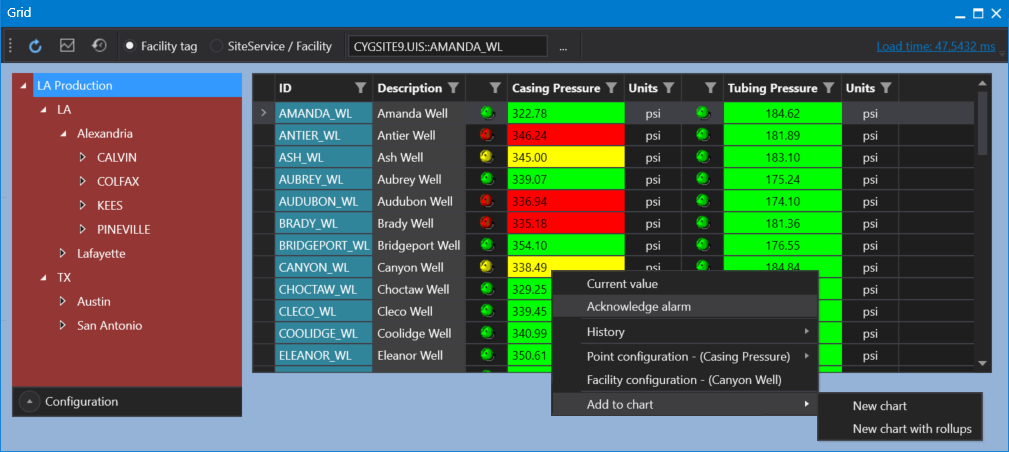
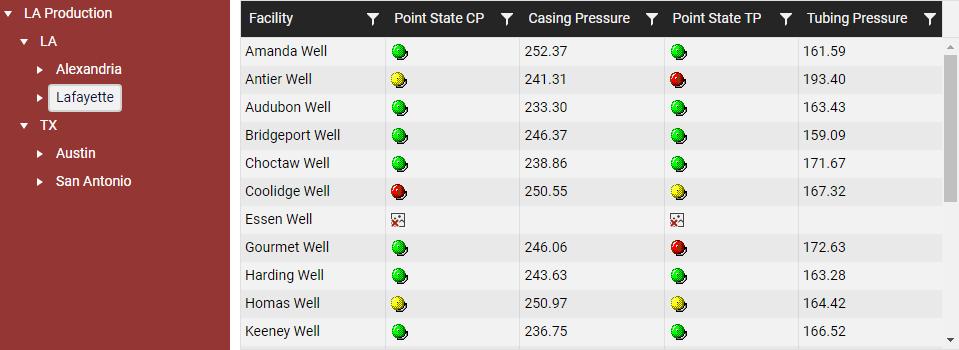
CygNet Grid Example
The following images show a CygNet Grid in the Canvas Native view and the CygNet TWC web view.
|
Click the thumbnail to see |
Click the thumbnail to see |
Property Inheritance
Property Inheritance
Property inheritance, or sending and receiving, is a widely used concept in Canvas. The application supports an explicit relationship between screens, objects, and controls, where certain property values, such as facilities and SiteService details, are passed from one element to another via an inheritance framework. Screens, objects, and controls can be configured as property senders or property receivers and provide configuration options where you can explicitly define the source of the facility and SiteService. Depending on how you have your screens, objects, and controls configured, the facility and SiteService may be received from any one of the following sources:
- from itself — indicated by selecting <Self> and then explicitly configuring the property
- received from the screen — indicated by selecting Screen, which is always present as a sender
- received from another control — indicated by selecting the Name of the sending control.
Broadcasting
Screens and objects support an additional notification option to broadcast their facility and SiteService selection changes to other open screens. If configured, a <Broadcast> option is available to source the screen's facility and SiteService properties from another open screen.
For example, a Text Tool can be configured to get its facility from the screen and the screen can be configured to get its facility from a Tag Chooser. Or Screen_A might source its facility from Screen_B, which gets its facility from a Tag Chooser.
Receiver or Sender
The CygNet Grid control supports property inheritance as a receiver of its SiteService and facility, and as a sender of its facility:
| Receive | Send | ||
|---|---|---|---|
| SiteService | Facility | SiteService | Facility |
| self screen |
self screen other controls |
none | screen other controls |
The CygNet Grid is multi-facility aware and depending on the level of a configured hierarchy selected (from an associated Tag Chooser) will depend on how many rows will be loaded into the associated grid.


