 The Dynagraph control is used to view dynagraph card data to provide a window into rod-pump well performance by displaying cards for available Pump Off Control (POC) facilities in your CygNet system. You can remotely monitor and control surface and downhole stroke position and load, configure pumpoff conditions, and analyze status data from your Canvas screens. The control displays cards from POC facilities that support the necessary data groups, as dynagraph card display is dependent on downhole calculation. Downhole calculation requires well specification and proper configuration in the DDS via the Downhole Configuration data group for the associated remote device.
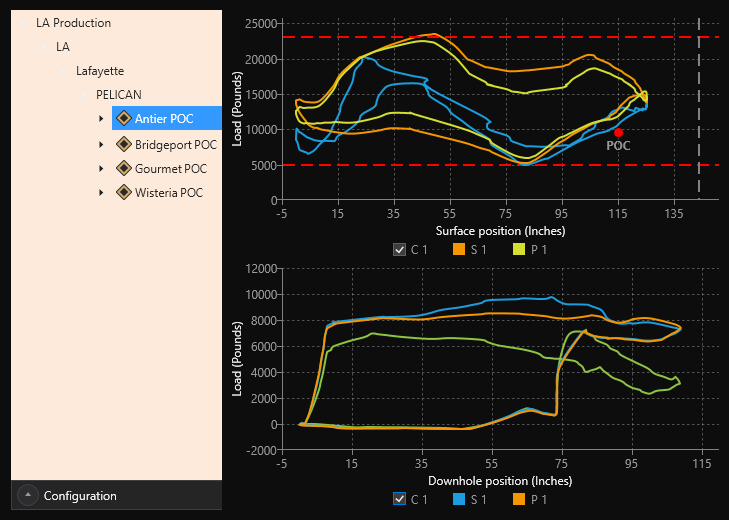
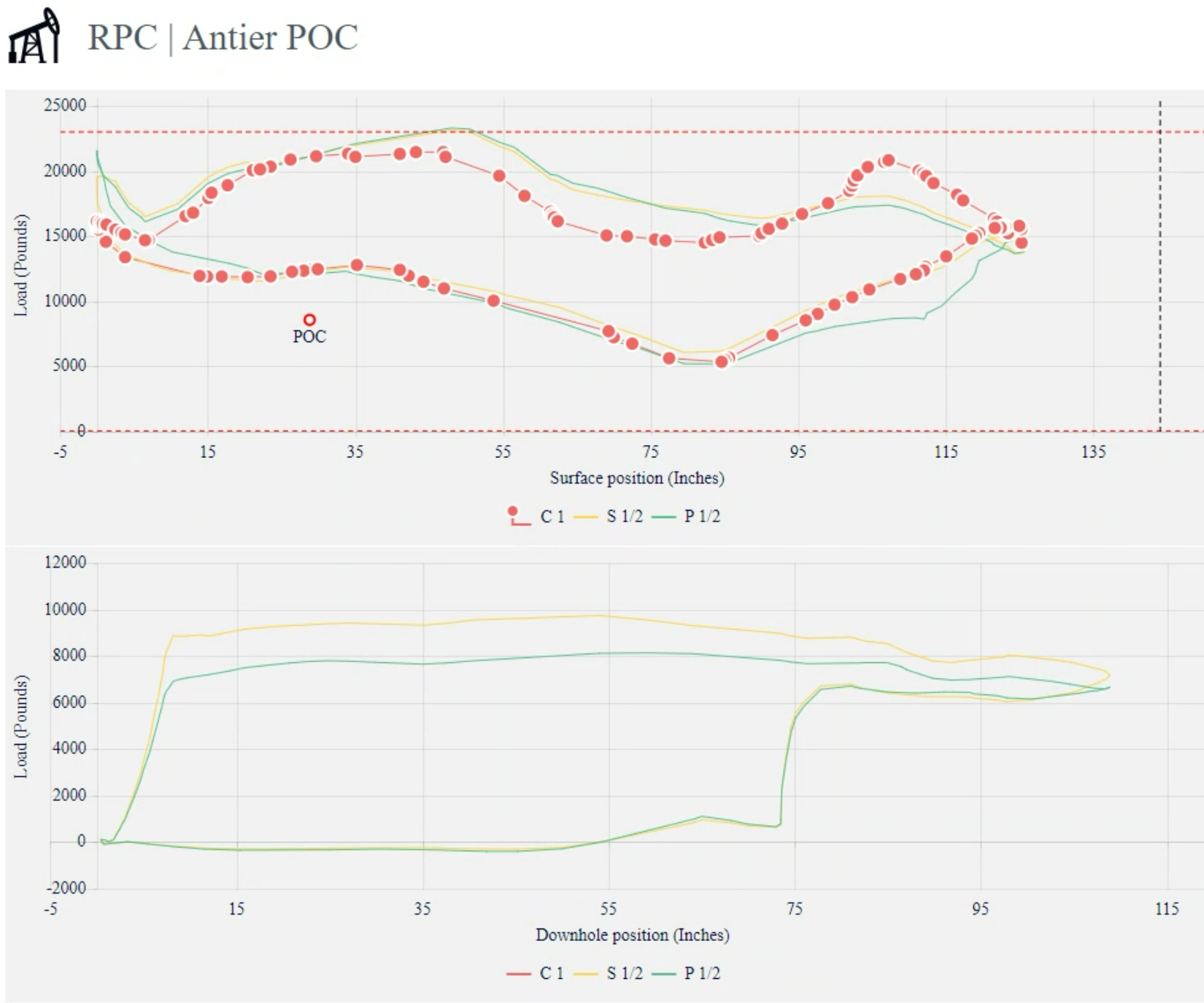
The control contains a card plot area displaying selected dynagraph card(s) (Surface, Downhole, or Both), to graphically illustrate load versus position data. Load (in pounds) is plotted on the vertical axis; position (in inches) is plotted on the horizontal axis. Although only one card type can be selected at a time, it is possible to select a set of cards to overlay in the card plot area. The POC (Pumpoff Condition) setpoint is displayed as a point within the stroke curve on the surface card. When the curve deviates such that the point is outside of it, a pumpoff condition occurs.
The Dynagraph control can be configured to receive its POC facility data from the screen or another Canvas control, such as a Tag Chooser, or it can be explicitly configured. The control includes an optional run-mode context menu that supports communication with devices to retrieve card data, and retrieve and edit pumpoff configuration data and fluid fill setpoint data.
This control is supported in the Canvas Native view and the CygNet TWC web view.
Additional Resources
For more information about dynagraph cards and CygNet system configuration (devices, facilities, data groups), see
-
CygNet Studio Dynagraph Control
For information regarding scripting and the Dynagraph Control object, see CxDynagraph.
Dynagraph Example
The following images show a Dynagraph control displaying a card plot area with both a surface card type and a downhole card type. A Current card, Shutdown card, and Pumpup card are overlayed on each card type. The facility (Antier POC) is determined by the selection in the Tag Chooser at the left. The red dot indicates the POC point, the upper red dotted line indicates the peak load, the lower red dotted line indicates the mean load, and the gray vertical line indicates the stroke length.
The following images show a Dynagraph control in the Canvas Native view and the CygNet TWC web view.
|
Click the thumbnail to see |
Click the thumbnail to see |
Property Inheritance
Property Inheritance
Property inheritance, or sending and receiving, is a widely used concept in Canvas. The application supports an explicit relationship between screens, objects, and controls, where certain property values, such as facilities and SiteService details, are passed from one element to another via an inheritance framework. Screens, objects, and controls can be configured as property senders or property receivers and provide configuration options where you can explicitly define the source of the facility and SiteService. Depending on how you have your screens, objects, and controls configured, the facility and SiteService may be received from any one of the following sources:
- from itself — indicated by selecting <Self> and then explicitly configuring the property
- received from the screen — indicated by selecting Screen, which is always present as a sender
- received from another control — indicated by selecting the Name of the sending control.
Broadcasting
Screens and objects support an additional notification option to broadcast their facility and SiteService selection changes to other open screens. If configured, a <Broadcast> option is available to source the screen's facility and SiteService properties from another open screen.
For example, a Text Tool can be configured to get its facility from the screen and the screen can be configured to get its facility from a Tag Chooser. Or Screen_A might source its facility from Screen_B, which gets its facility from a Tag Chooser.
Receiver or Sender
The Dynagraph control supports property inheritance as a receiver of its SiteService and facility:
| Receive from | Send to | ||
|---|---|---|---|
| SiteService | Facility | SiteService | Facility |
| self screen |
self screen other controls |
none | none |
The Dynagraph control does not send its SiteService or facility to other controls.


