
 The Heat Map is a CygNet-aware tool that can be used to display historical CygNet data in a two-dimensional representation in which data values are represented by a range of configurable colors. Its purpose is to visualize data in colored rectangular cells where the color of each cell represents the cell's value and makes it easy to compare all data values. Several other configuration properties are supported, including: configurable date ranges, both relative and absolute; historical rollup values; background, low range color, and high range color; visible color scale; cell padding, labels, and tooltips; visible top labels, and row height.
Note: The Heat Map will not display a cell for negative, zero, or undefined values.
Heat Map Example
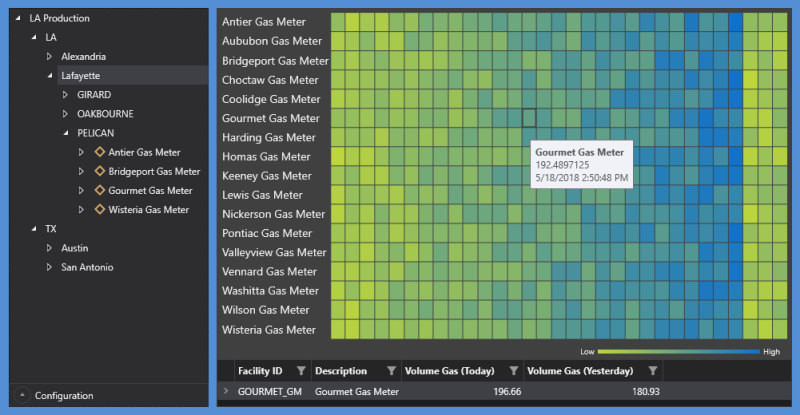
In the following example, the Heat Map is receiving Volume Gas values from the Tag Chooser for meters in the selected area (Lafayette), which is filtered by facility type (gas meter). Tooltips are enabled to display when hovering over each cell of the Heat Map.
|
Sample Heat Map driven by facilities selected in the Tag Chooser, with CygNet Grid below |
Property Inheritance
Property Inheritance
Property inheritance, or sending and receiving, is a widely used concept in Canvas. The application supports an explicit relationship between screens, objects, and controls, where certain property values, such as facilities and SiteService details, are passed from one element to another via an inheritance framework. Screens, objects, and controls can be configured as property senders or property receivers and provide configuration options where you can explicitly define the source of the facility and SiteService. Depending on how you have your screens, objects, and controls configured, the facility and SiteService may be received from any one of the following sources:
- from itself — indicated by selecting <Self> and then explicitly configuring the property
- received from the screen — indicated by selecting Screen, which is always present as a sender
- received from another control — indicated by selecting the Name of the sending control.
Broadcasting
Screens and objects support an additional notification option to broadcast their facility and SiteService selection changes to other open screens. If configured, a <Broadcast> option is available to source the screen's facility and SiteService properties from another open screen.
For example, a Text Tool can be configured to get its facility from the screen and the screen can be configured to get its facility from a Tag Chooser. Or Screen_A might source its facility from Screen_B, which gets its facility from a Tag Chooser.
Receiver or Sender
The Heat Map control supports property inheritance as a receiver and sender of its facility:
| Receive from | Send to | ||
|---|---|---|---|
| SiteService | Facility | SiteService | Facility |
| none | screen other controls |
none | screen other controls |


