Alarm Suppression Settings
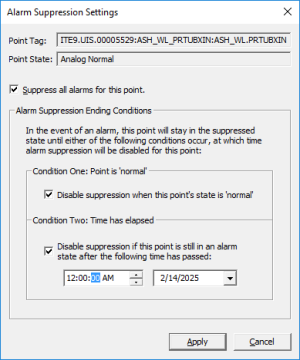
Use the Alarm Suppression Settings dialog box to configure when alarm suppression will end for all alarms on the selected point.
|
Alarm Suppression Settings dialog box |
- Right-click the alarm and select Alarm suppression... to suppress an alarm.
- The Alarm Suppression Settings dialog box will list the Point Tag and Point State for the selected alarm.
- Click to enable Suppress all alarms for this point.
- Click to enable one or both suppression ending conditions.
- Configure a date for Condition Two, if selected.
- Click Apply.
- Click Yes to the confirmation message. Another message box appears giving the status of the suppression settings.
- Click Done.