Color Picker
|
Use the color picker to select a color for your screen, control, or text. Colors are arranged into the following categories:
Configure a colorIf you want to more finely configure a color, click The color pane includes the following palette types in a drop-down menu:
|
|
 at the bottom to expand the color pane.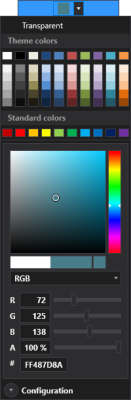
Notes:
Each palette type includes the following options:
- The A or Alpha value is an additional parameter that specifies the opacity of the color, represented by a number between 0% (fully transparent) and 100% (fully opaque).
- The # or hexadecimal notation (#aarrggbb) is used to describe semi-transparent colors. The first two values correspond to the Alpha opacity, the remaining hex triplet represents the RGB values. For example, #FF0000FF is fully opaque blue, #80FF0000 is 50% transparent red.
Perform one of the following steps to configure a color:
- Click on the palette to select the desired color.
- Use the slider on the vertical color bar to slide up and down to select the desired color. The values below will adjust accordingly. The Alpha value will not change. It must be changed manually.
- Adjust the sliders next to each number and adjust accordingly or type in a percent or degree value.