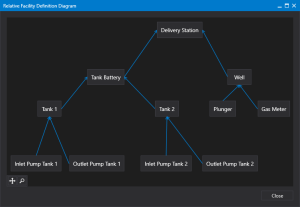
Relative Facility Definition Diagram
Use the Relative Facility Definitions Diagram dialog box to examine the relationships between definitions. This dialog box is accessible from two places in the relative facilities UI:
- from the Relative Facility Tester dialog box
- from the Relative Facility Definitions configuration dialog box
Return to the Relative Facility Definitions configuration dialog box to reconfigure as necessary.
|
Relative Facilities Definition configuration |
Navigation Pane
The diagram includes a navigation pane in the bottom left corner to zoom and pan around the diagram.
 To use the navigation pane
- Click
 (Open) to access the navigation pane.
 - Click on the zoom slider to zoom in and out of the area you wish to examine.
- Use the red Zoom thumbnail to pan around the area.
- Click
 (Close) to close the navigation pane.
 - Click
 (Auto fit) to return to 100% size.