Select Facility Service
Use the Select Service dialog box to select a Facility service for the control to use.
|
Select Facility service (FAC) |
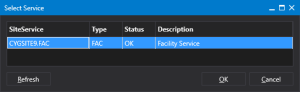
- Select a SiteService from the list of available services in the ambient domain.
- Click Refresh to update the list of services.
- Click OK to accept the selection and close the dialog box.
- Click Cancel to close the dialog box without making a selection.