Several counters are optionally available in CygNet to monitor the performance of your CygNet Thin Web Client servers (TWC.Service.Server and TWC.PublishingService.Server). Note the following items:
- The server metrics listed in the table below are available for collection from the TWC servers, passed to CygNet and stored in the UIS, if associated points have been created.
- You must manually create points in the PNT if you want to collect the performance data.
- UDCs, points, and values for the server metrics can be visualized in Canvas controls, so you can create screens to view server performance in the Canvas Native view or in the CygNet TWC web view.
- Some configuration options must be set in the configuration.json file, see below: the name of the UIS where the metric will be written, the name of the server facility, and the refresh interval.
Metrics Collected from the TWC Servers
The following server metrics are available for tracking visualization from the TWC.Service.Server and the TWC.PublishingService.Server:
| Metric Name | UDC | Description |
|---|---|---|
|
TWC.Service.Server |
||
|
Connection Queue Length |
SVKSCNQLEN |
The length of the connection queue in the TWC.Service.Server. |
|
CPU Usage |
SVRTPCTCPU |
The percentage of the TWC.Service.Server’s CPU usage relative to all system CPU resources. Note: CPU Usage measures the usage of the current process as a whole, not the usage of the listeners. |
|
Current Connections |
SVKSCURCNS |
The number of current active connections to the TWC.Service.Server. |
|
Total Connections |
SVKSTTLCNS |
The total number of connections to the TWC.Service.Server. |
|
Failed TLS Handshakes |
SVKSFLDHS |
The total number of failed TLS handshakes with the TWC.Service.Server. |
|
Total TLS Handshakes |
SVKSTTLSHS |
The total number of TLS handshakes with the TWC.Service.Server. |
|
Logged in Users |
LGDINUSRS |
The number of users currently logged in to the TWC.Service.Server. This is a separate count from the number of Current Connections. |
|
Registered Users |
REGUSRS |
The number of registered users on the TWC.Service.Server. |
|
Unique Caches |
UNQCASHCT |
The number of unique caches in the TWC.Service.Server. |
|
Working Set |
SVRTPHSMEM |
The number of megabytes of physical memory mapped to the process context at a point in time based on Environment.WorkingSet. |
|
TWC.PublishingService.Server |
||
|
Active Application Name |
ACTVAPPNM |
The name of the active application in the publishing queue. |
|
Active Job ID |
ACTVJOBID |
The ID of the active job in the publishing queue. |
|
Active Job Start Time |
ACTVJBSTTM |
The time the active job in the publishing queue started. |
|
Connection Queue Length |
PBKSCNQLEN |
The length of the connection queue in the TWC.PublishingService.Server. |
|
CPU Usage |
PBRTPCTCPU |
The percentage of the TWC.PublishingService.Server’s CPU usage relative to all system CPU resources. Note: CPU Usage measures the usage of the current process as a whole, not the usage of the listeners. |
|
Current Connections |
PBKSCURCNS |
The number of current active connections to the TWC.PublishingService.Server. |
|
Total Connections |
PBKSTTLCNS |
The total number of connections to the TWC.PublishingService.Server. |
|
Failed TLS Handshakes |
PBKSFLDHS |
The total number of failed TLS handshakes with the TWC.PublishingService.Server. |
|
Total TLS Handshakes |
PBKSTTLSHS |
The total number of TLS handshakes with the TWC.PublishingService.Server. |
|
Working Set |
PBRTPHSMEM |
The number of megabytes of physical memory mapped to the process context at a point in time based on Environment.WorkingSet. |
|
Server State |
PBSVRST |
The current status of the PublishingService.Server. Options are Active or Idle. |
|
Queue Count |
QJOBCT |
The number of jobs in the PublishingService.Server queue. |
Point Configuration
TWC server metrics collection is optional. If you want to track and observe some (or all) of the available counters, you will need to manually create points in your CygNet PNT service for the desired point scheme.
- Site.Service — Select the UIS associated with the PNT. Determined by the "MetricSiteService" value in the configuration.json file.
- Facility ID — This is the metrics facility associated with the values coming from the TWC servers. The facility ID is determined by the "MetricsFacilityId" value in the configuration.json file.
- UDC — The UDC must match the names that are used by the listeners that are associated with the event names; these are described in the table above.
- History — Optionally report values to the VHS, if desired.
- Alarms — Optionally configure thresholds on any point, to report alarms to the CAS and/or GNS.
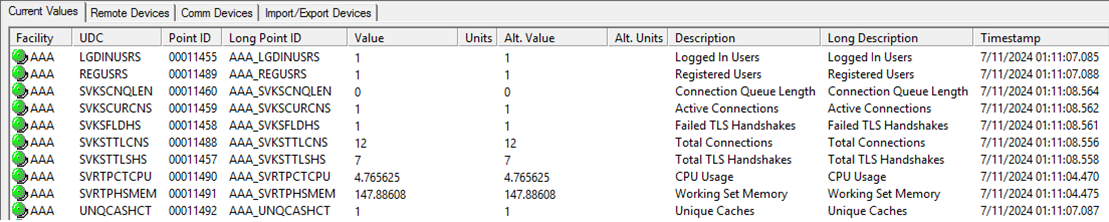
Once a point is created with the appropriate UDC and facility ID, the associated metric value will be written to the point without any additional configuration. The listeners are constantly receiving updated values from the event sources and reporting them at the refresh interval specified in the configuration.json file, even if no associated point exists.
|
Sample TWC Server Metrics in UIS |
Other Configuration Options
The following configuration options are stored in the Config\configuration.json file in the folder where the TWC services are installed, usually C:\CygNetTWC. Edit the configuration.json file with a text editor to change values as desired. See Using the Configuration.json File for more information.
| Key | Default Value | Description |
|---|---|---|
|
"MetricsFacilityId", |
"AAA", |
The name of the facility to which all server metrics are assigned. All server metrics, regardless of their source, will be associated with this facility ID. |
|
"MetricSiteService", |
"SITE.UIS", |
The name of the UIS where the metrics are written, specified during installation. Usually this is the same site as the ACS. |
|
"RefreshInterval", |
"5", |
The frequency, in seconds, each server metric is reported to CygNet. The default is every 5 seconds. |
Visualizing Server Data in Canvas and TWC
The server metrics can be viewed in the UIS in CygNet Explorer, or added to a Canvas screen where you can visualize or trend any data point(s), and then published to the CygNet TWC web view, if desired.
Server Metrics Sample Screens
A set of sample Canvas Server Metrics screens are available in the CygNet Reference Packages distributed with the CygNet Thin Web Client upgrade files, which can be downloaded from the CygNet Download Site (login required) site.


