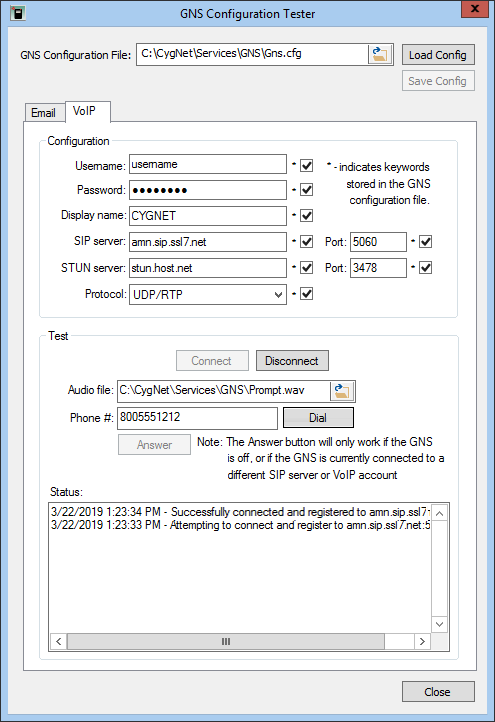
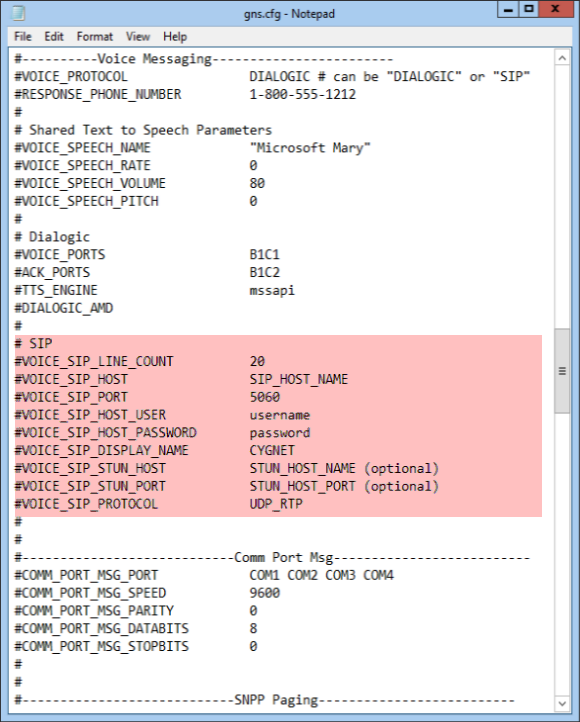
The VoIP page of the GNS Configuration Tester defines parameters for the voice messaging keywords in the GNS configuration file and allows users to modify the SIP settings in the Gns.cfg file. The page also provides a test feature to connect and interact with the specified SIP server.
The following is an example of the VoIP page of the GNS Configuration Tester dialog box with its corresponding GNS configuration file settings:
|
|
|
| VoIP page of GNS Configuration Tester with corresponding Keywords in the GNS Configuration File | |
The properties on the VoIP page of the GNS Configuration Tester dialog box are described here. These settings also can be changed using the Config File Manager.
Note: To configure your system to test VoIP in your specific environment, see your vendor-provided documentation.
To Configure the VoIP Properties in the GNS Configuration Tester Utility
-OR-
| Field | Description | Associated Gns.cfg File Keyword |
|---|---|---|
|
GNS Configuration File |
The path to the GNS configuration file (Gns.cfg). Click the folder icon to browse to the file on the CygNet host. |
N/A |
|
Configuration |
||
|
Username |
Specifies the user ID to register to the SIP host. Note: When VOICE_PROTOCOL is set to "SIP", this keyword is required. |
VOICE_SIP_HOST_USER |
|
Password |
Specifies the user password. Note: When VOICE_PROTOCOL is set to "SIP", this keyword is required. |
VOICE_SIP_HOST_PASSWORD |
|
Display name |
Specifies the display name that may be made available to recipients for identification (e.g. caller ID) purposes. Optional field. |
VOICE_SIP_DISPLAY_NAME |
|
SIP server |
Specifies the name of the host server providing the SIP connection. Note: When VOICE_PROTOCOL is set to "SIP", this keyword is required. |
VOICE_SIP_HOST |
|
Port |
Specifies the port used by the SIP host for SIP connections. Note: When VOICE_PROTOCOL is set to "SIP", this keyword is required. |
VOICE_SIP_PORT |
|
STUN server |
Specifies the name of the host server providing STUN services for the SIP connection. Optional field. |
VOICE_SIP_STUN_HOST |
|
Port |
Specifies the port used by the STUN host for STUN services. Optional field. |
VOICE_SIP_STUN_PORT |
|
Protocol |
Specifies the SIP transport and media transfer protocols used by the SIP host for VoIP communications. Default is "UDP_RTP", which means that the SIP client will use UDP for SIP transport and RTP for media transfer. Note: "UDP_RTP" is the only available value. |
VOICE_SIP_PROTOCOL |
|
Test |
||
|
Audio file |
The path to the WAV file played by the SIP client when a call is placed or answered using the GNS Configuration Tester utility. Note: WAV files must be 8000Hz, 16000Hz, 32000Hz, or 48000Hz mono 16-bit PCM format. |
N/A |
|
Phone # |
The number that is dialed when the Dial button is clicked. If the phone number of the VoIP account for the connected SIP server/user is called, the Answer button is enabled, allowing a user to answer the call within the utility. |
N/A |
|
Status |
Displays the status of the connection. |
N/A |

|
|
|

