
CygNet Software supports three types of messages for its notifications: Alphanumeric messages, numeric messages, and WAV messages. The message type is dependent upon the notification address type. For example, numeric pagers can receive only numeric messages.
See Defining an Event Record and Configuring Messages for more information about configuring messages.
The message types are listed in the table below.
| Notification Message Type | Notification Address Type |
|---|---|
|
Alphanumeric Message |
|
|
Numeric Message |
|
|
WAV Message |
|
Alphanumeric message types can be static or can be dynamically created by the system based on current data in the Universal Interface Service, the Facility Service, or the Point Service. The identifiers used to create dynamic messages are called "tokens." When the notification is sent, the GNS will replace the token(s) with the appropriate data.
For example, if you use the token "%value%", the current value of the point will be inserted into the notification in place of the token. You can include both static and dynamic information in a notification. Anything that is not a token is treated as text and is included in the message as it appears, including punctuation.
The following message uses both static and dynamic text:
|
%description% alarm on %facility_desc% (%facility_id%). The value is %value% %primaryunits%. Time of alarm: %time%. %facility_desc% is on %facility_table2_desc%. |
The resulting message would be as shown below. The dynamic text is shown in bold.
|
Differential pressure alarm on SugarCreek East (SugarCreek1). The value is 11.37PSI. Time of alarm: 16:06:44 April 15 2019. SugarCreek East is on Route 1. |
A token must be contained in percent signs ( % ). The text is not case sensitive. See Using Tokens in Notifications for usage.
Static messages can be useful for notifications for specific events.
Dynamic messages are created on an ad hoc basis using tokens. As such, a single message can be applied to a wide range of tags. The notification shown below is a dynamic message. The tokens are enclosed in percent signs (%).
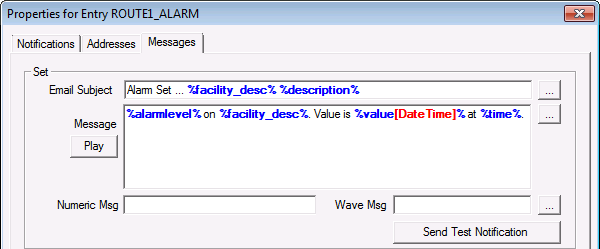
A single GNS event record message using tokens may be assigned to more than one point in the PNT. See Assigning a Notification to an Alarm for more information.
Shown below is a GNS event record message:
|
%description% %alarmlevel% on %facility_id%. Value is %value%. |
Resulting notification for one tag:
|
Gas Temperature High Alarm on McKee 2-1. Value is 45.0128. |
The same GNS event record can be applied to any number of tags. Below is the message from the same GNS event record but assigned to a different tag.
|
Board Temperature High Warning on McKee 2-1. Value is 97.0533. |

|
|
|

