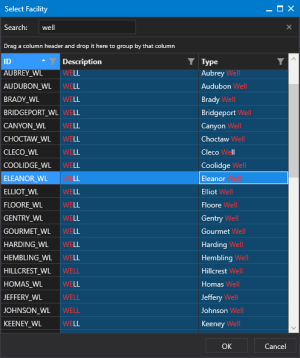
Select a facility
Use the Select Facility dialog box to select a facility for your control.
|
Select a facility |
The contents of the Select Facility dialog box can be searched, grouped, sorted, and filtered to limit the results:
| Column | Description |
|---|---|
|
Search |
Search for any word or phrase by typing in the Search tools box. The search operation is case insensitive. Any matching strings will be shown in red text. There are three additional search operators available: Quoted stringsWhen a word or a phrase is typed in quotation marks (""), the found results will contain only the exact same value. For example, "tank level", will yield only instances of tank level.
Additive searchWhen a word or a phrase is typed after a plus sign (+), the found results will contain both the value before the operator and the one after it. For example, tank +level, will yield all instances of tank, plus all instances of tank level.
Negative searchWhen a word or a phrase is typed after a minus sign (-), the found results will contain the value before the operator, but not the one after it. For example, tank -level, will yield all instances of tank, but no instances of tank level.
Note that the search operators can be concatenated to yield desired results, for example, string -string -string. Click |
|
Grouped |
Drag any column header to the area above the column headers to group rows by that column. You can group by any number of columns.
|
|
Sort |
Click any column header to sort that column in ascending or descending order. |
|
Filter columns |
Click |



 to remove the search term from the Search box.
 in the column header to filter the rows as needed. Click