 (Edit definition set) to open the Relative Facility Definitions for '<name of definition set>' dialog box.
This topic describes how to configure relative facility definitions via the Canvas user interface.
(Edit definition set) to open the Relative Facility Definitions for '<name of definition set>' dialog box.
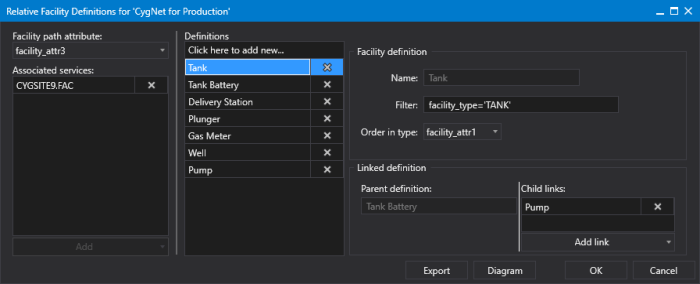
Relative Facilities Definition Configuration
This Filter describes the facilities in the data hierarchy that can be used as starting facilities for linked facility paths. It also provides a path to terminal facilities.
Filter values may include facility attribute names, facility attribute values, and the operators AND and OR, =, <, and >.
The syntax for Filter is:
facility_attribute {= | <> | < | <= | > | >=} 'value'
[{ AND | OR } facility_attribute {= | <> | < | <= | > | >=} 'value'] [...]Examples:
facility_type = 'METER_RUN'
facility_type = 'METER' AND facility_attr1 = 'Water'
facility_type='TANK' AND facility_attr1='3' AND facility_table7='OIL'
 (Delete associated service / Delete definition / Delete child link) to remove any item as necessary.
The Relative Facility Definitions dialog box contains the following options and properties:
| Option | Description |
|---|---|
|
Facility path attribute |
Specifies the facility attribute containing the facility link. Options include a hard-coded list of generic text attributes including facility_info0, facility_info1, and facility_attr0 to facility_attr29. |
|
Associated services |
The list of Facility service(s) associated with this definition. Multiple Facility services can be associated with the same relative facility definition. |
|
Definitions |
A list of the definitions configured for this definition set. Click Click here to add new... to add a facility type and populate the necessary fields. |
|
Facility definition |
Each relative facility definition requires a Name , a Filter, and an Order in Type, described below. |
|
Name |
Specifies the facility type name (such as Meter, Well, Tank Battery, etc.). |
|
Filter |
Specifies the filter that identifies, in CygNet, the named facility type. The filter is used to limit the facility definition and describes the facilities in the data hierarchy that can be used as starting facilities for linked facility paths. For example: |
|
Order in Type |
Specifies the facility attribute used to represent the order in type (the facility ordinal) for this relative facility definition. The Order in type is used to account for multiple children of a certain type. For example, in a Tank Battery with multiple tanks, this attribute would specify the order of the child tanks in the tank farm. A blank attribute value means that the property is not to be used and will not be configurable when specifying a relative link on a Canvas screen or control. Options include a hard-coded list of generic text attributes including facility_info0, facility_info1, and facility_attr0 to facility_attr29. Note the following: Specifying an Order in type attribute reduces the number of relative facility definitions. Resolution must be the last resolved facility in the path or chain. Order-in-type-based definitions can allow for the creation of multi-parent configuration; this should be avoided. See Design Considerations for more information about creating Order-in-type-based definitions. |
|
Linked definition |
Each facility definition displays a Parent definition and requires one or more Child links, described below. |
|
Parent definition |
Displays a read-only field showing the parent facility for the selected definition. If the definition is the top of a hierarchy, no Parent definition is shown. |
|
Child links |
A list of child links defined for any selected definition. |
|
Export |
Click Export to export your relative facility definitions to an XML file. Browse to a known location, enter a file name, and click Save. |
|
Diagram |
Click Diagram to see a graphical representation of the relative facility definitions configured for this definition set. |
|
|
|

