Alarm Configuration Priority Distribution Screen
The Alarm Configuration Priority Distribution screen (CRM AQ - Config Distribution.csf) shows the number of points that are configured with Alarm Priorities of either Critical or High categories. By selecting the Show button next to the appropriate Alarm Priority Category the points will be shown in the data grid to the right.
|
Click the thumbnail to see |
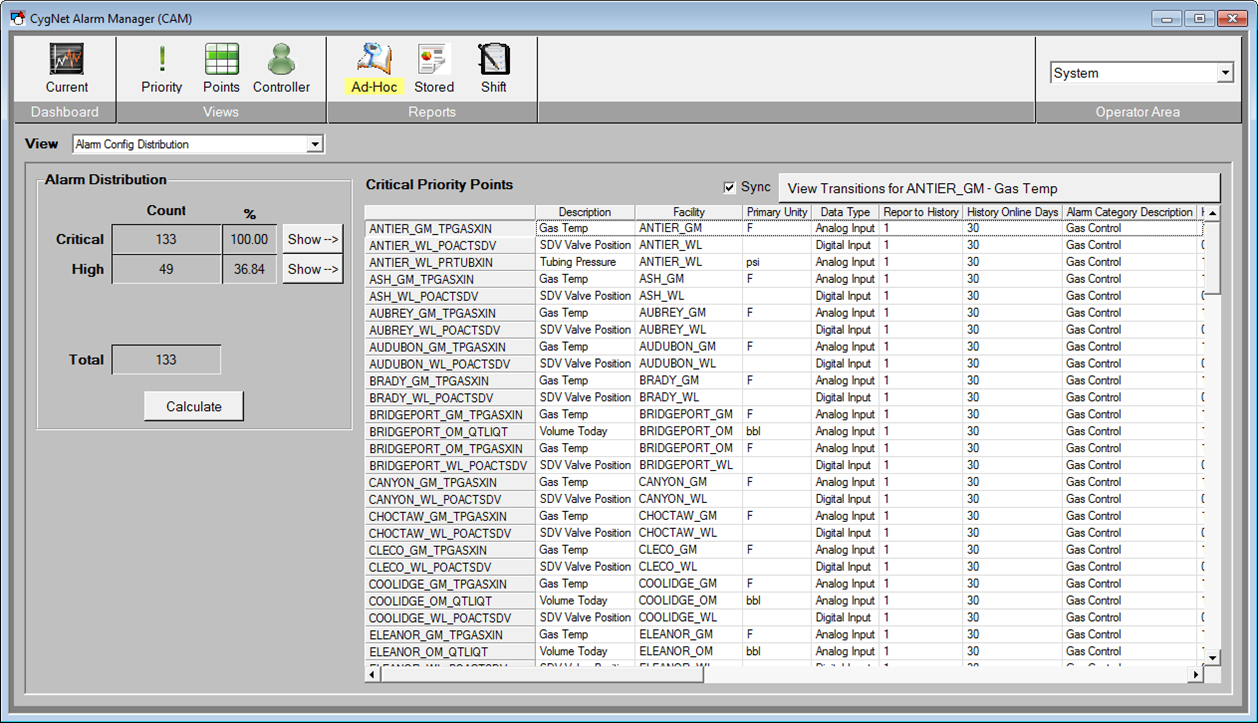
In addition to the count of points for the particular Alarm Priority Category, the screen performs a simple calculation to determine the percentage of points configured for each category.
See Alarm Priority, Alarm Priority Category, and Alarm Category for additional information about Alarm Priority and Alarm Priority Category.
When an event (or point) is selected in the list, the View Transitions button will be enabled and display the associated point to that particular Alarm.
|
View Transitions button |

Select View Transitions to open the Point Transition Detail screen for more detailed information about the particular point. This screen shows not only the "SET" alarms, but "RESETS", "ACKS", and other states.
If additional Alarm Priority Categories are needed, this screen and the code it uses will need to be modified to accommodate specific user requirements.


