Configuring Reports — Storage
The Storage page of the New/Edit Report Configuration dialog box defines where to save the report, and includes email settings.
|
Report storage |
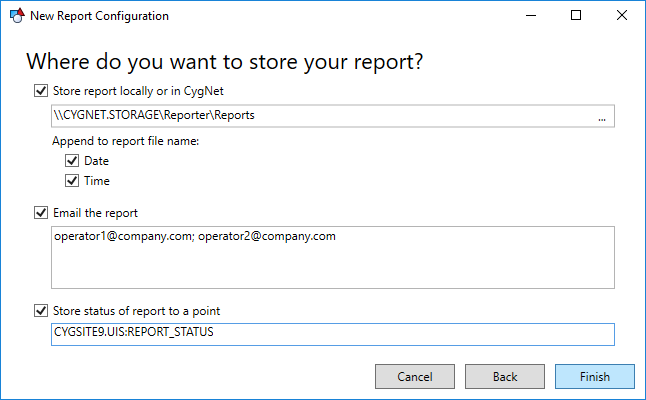
Report files can be stored in a file system (local or CygNet Group service based) or emailed.
Group service based file paths take the form: \\SITE.SERVICE\folder1\folder2\...
The following characters are invalid: < > : " | ? *
For file system storage, the filename can have the date and/or time the report was generated appended to the name to ensure filename uniqueness.
Files can be emailed to a semi-colon-delimited list of email addresses. The necessary SMTP server information must also be configured in the Report Module configuration point. For HTML reports, there is an option to either include the HTML file as an attachment or embedded as the body of the email.
Report Status
The status of the report's latest run can also be stored to an existing CygNet point for alarming or historical storage. The format is Site.Service:LongID, for example MYSITE.UIS:REPORT_STATUS.
Click Finish to save the report definition.

