Configuring Reports — History Points
The History Points page of the New/Edit Report Configuration dialog box defines the points to include in the Historical Value Report.
For the One value per row format of Historical Value Report, you'll also need to specify which points you want to display in the report.
|
History points |
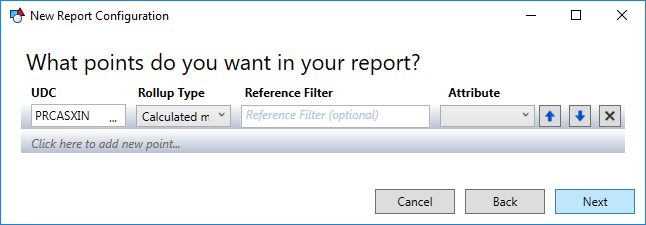
The UDC and Rollup Type are required.
- Click … on the UDC drop-down menu to open the CygNet UDC Selector dialog box. You can sort on the UDC and Description columns to find the desired UDC. Select the CVS, UDC category, and UDC.
- Select the desired Rollup Type from the drop-down menu. See History Rollup Type for more information about rollup types.
Reference Filter and Attribute are used to connect a row to the value in a reference facility (rather than the facility itself) and are therefore not required.
Click Next to move to the next page of the New/Edit Report Configuration dialog box.

