Reporting Options
History is normally reported on an exception basis; that is, a record is written to the historian only if the point’s value or status has changed. Status includes its reliability and alarm bits.
You can change this reporting model using additional reporting options, such as the Maximum reporting interval, Minimum evaluation time, and Force evaluation on update without changed value options of the point's configuration record.
|
|
|
Setting these reporting options will change |
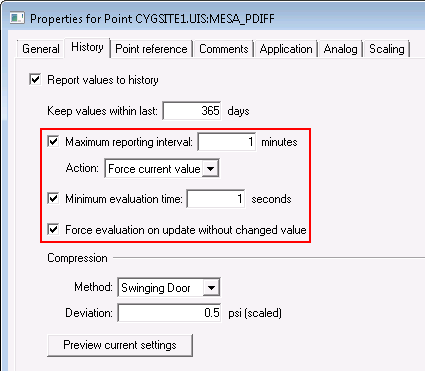
Maximum Reporting Interval
The Maximum reporting interval setting specifies the maximum update time interval (in minutes) for reporting the current value to the historian. For a point that is configured with this setting, the CVS will always report a new value to the VHS, if the time interval between the last value reported to the VHS and the new value exceeds the configured maximum reporting interval. Two reporting actions are provided:
- Report next value — report the next new value that comes in to the CVS
- Force current value — force the current value to be reported to the VHS, even if there is no change in value or status from the last value.
This setting is useful for points that have infrequent value or status changes, but don’t require Force evaluation on update.
Notes:
Maximum reporting interval (maximumreportinginterval) replaced Force Period (forceperiod), which is now obsolete, although the old attribute has been retained for backwards compatibility.
Force current value (forcecurrentval) replaced Force History (forcehistory), which is now obsolete, although the old attribute has been retained for backwards compatibility.
Minimum Evaluation Time
The Minimum evaluation time setting specifies the minimum update time interval (in seconds) for evaluating whether a new value will be reported to the VHS. For a point that is configured with this setting, the CVS will not report a value to the VHS, unless the time interval between the last evaluated value reported to the VHS and the new value exceeds the configured minimum evaluation time.
Minimum evaluation time is important when using CygNet Swinging Door (CSD) compression. When CSD compression is configured to be performed for a point, a new value will be reported to the VHS, assuming any configured Minimum evaluation time interval setting has been exceeded, when the slope of the line calculated between the last value reported to the VHS and the new value falls outside the slope Deviation range.
Use Minimum evaluation time with care. It is best used for points that report frequently and you want to save limited data portraying a representative trend curve.
Example
By setting the minimum evaluation time to 10 seconds, the system waits to see the next value that comes in to the CVS. CygNet will then evaluate whether to report the value to the VHS, and then wait another 10 seconds from last the event to evaluate again, even if last evaluation was not to report the value to the VHS.
Force Evaluation
The Force evaluation on update without changed value option forces an evaluation of each new value for reporting to the VHS, regardless of whether the point’s value or status has changed. Force evaluation forces values that look like repeats to be considered. This is useful when you require a value for every poll. However, by configuring compression you can fine tune how much data is reported by enabling the Minimum evaluation time and Deviation settings.
If this setting is not selected, the point will be reported to the VHS by exception only (value or status change).
Example
With force evaluation disabled, any new value that is unchanged from the previous value (except for its timestamp) is ignored. These incoming values look like repeats, which are considered unimportant and therefore not reported to the VHS. A tank reporting its level every 15 minutes may report identical values, which are considered repeats and thus not reported.
The only exception to these settings will be for status bit changes from a previous value, which will override all configured settings and thus be reported.
Note: Force evaluation on update without changed values (forceevaluationonupdate) replaced Force History On Update (forcehistoryonupdate), which is now obsolete, although the old attribute has been retained for backwards compatibility.
History Data Groups
Certain data groups retrieve an array of data for a point, for example, a data group that returns an average value for each minute of an hour or a data group that returns an accumulated value for each hour of the day. When these points report data to the VHS, all of the data in the array is reported to the VHS, even if the point is configured to report by exception and all of the values remain unchanged.


