Enumeration Point Properties
Use the Enumeration page to configure enumeration properties for a particular point. The Enumeration page is shown when the point type is set to Enumeration Input or Enumeration Output on the General page.
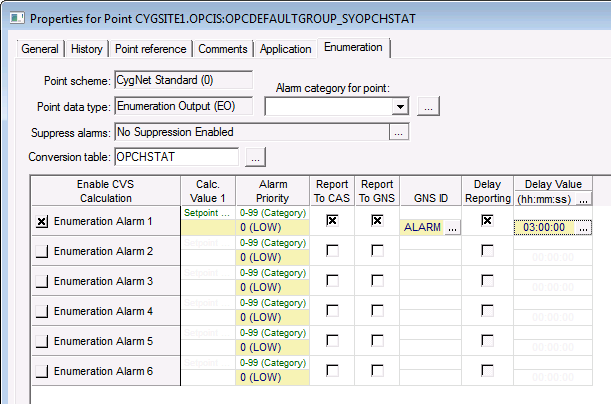
|
| Click the thumbnail to see a sample Enumeration page for an Existing Point |
Enumeration Properties
These are the properties shown on the Enumeration page in the PNT Editor. See also the ALARMSET security event for more information.
See Token Categories - Point: Alarm for the corresponding tokens for each property and Filter Attributes - Point: Alarm for the corresponding filter attributes for each property.
| Property | Description | Default Value | ||||||||||||||||||
|---|---|---|---|---|---|---|---|---|---|---|---|---|---|---|---|---|---|---|---|---|
|
Point scheme |
Read-only. This value is set on the General page. |
|
||||||||||||||||||
|
Point data type |
Read-only. This value is set on the General page. |
|
||||||||||||||||||
|
Alarm category for point |
Select the alarm category for the point. Click … to select a table entry. The entry comes from the PNTALCAT table. |
Blank |
||||||||||||||||||
|
Suppress alarms |
Enables or disables suppression of alarms for the point and the suppression ending condition(s). Click … to configure Alarm Suppression. See also the ALMSUPP security event for more information. |
0 (No) |
||||||||||||||||||
|
Conversion table |
Specifies the name of the table in the TRS that contains the integer to string conversions for the point. Option is any valid table name in the TRS. Although not required to define an enumeration point, it is recommended that a table name in the TRS be used. The maximum length for the name of a TRS table is 8 characters. |
Blank |
||||||||||||||||||
| Alarm Properties | ||||||||||||||||||||
|
Enable CVS Calculation Enumeration Alarm 1 Enabled Enumeration Alarm 2 Enabled Enumeration Alarm 3 Enabled Enumeration Alarm 4 Enabled Enumeration Alarm 5 Enabled Enumeration Alarm 6 Enabled |
Enables the alarm bit. Options are 0 (No) or 1 (Yes). The alarm bit can be enabled without the Report Alarms flag set. In the CygNet Standard Point Scheme, the alarms correspond to the following bits and alarm calculation types:
See also the CFGBITxx security event for more information. |
0 (No) |
||||||||||||||||||
|
Calculation Value 1 Enumeration Alarm 1 Calc Value 1 Enumeration Alarm 2 Calc Value 1 Enumeration Alarm 3 Calc Value 1 Enumeration Alarm 4 Calc Value 1 Enumeration Alarm 5 Calc Value 1 Enumeration Alarm 6 Calc Value 1 |
Specifies the setpoint for the alarm. A setpoint must match a value from the point’s enumeration table. Setpoints are case sensitive. |
Blank |
||||||||||||||||||
|
Alarm Priority Enumeration Alarm 1 Priority Enumeration Alarm 2 Priority Enumeration Alarm 3 Priority Enumeration Alarm 4 Priority Enumeration Alarm 5 Priority Enumeration Alarm 6 Priority |
Specify the priority of the point’s alarms. Option is 0 to 99, with 99 being the highest. In the CygNet Standard Point Scheme (0), alarm priorities are categorized as follows:
|
0 |
||||||||||||||||||
|
Report To CAS |
Select to reporting point alarms to the Common Alarm Service (CAS). Options are 0 (No) or 1 (Yes). The individual alarm bits must be enabled. |
0 (No) |
||||||||||||||||||
|
Report To GNS |
Select to report point alarms to the General Notification Service (GNS), which will send notifications when an alarm bit is set/reset. Options are 0 (No) or 1 (Yes). The individual alarm bits must be enabled. |
0 (No) |
||||||||||||||||||
|
GNS ID |
Select the ID of the GNS record to use for the notification regarding the alarm. The record type must be "Event" or "Unspecified." Click … to select a GNS ID. See Configuring a GNS Record for information about setting up GNS IDs. |
Blank |
||||||||||||||||||
|
Delay Reporting |
Select to delay reporting of the alarm to the CAS or to the GNS for some period of time to see if the point goes out of alarm. Options are 0 (No) or 1 (Yes). The individual alarm bits must be enabled. |
0 (No) |
||||||||||||||||||
|
Delay Value |
Specify the amount of time to delay reporting alarms or processing notifications. The countdown begins when the alarm bit gets set. When set, that delay time governs all delay times for the point. Click … to enter the reporting delay value. The format is as follows:
|
00:00:00 (hh:mm:ss) |
||||||||||||||||||
Enhanced Alarm Configuration
Enhanced Alarm Configuration (EAC) expands the CygNet alarm rules to allow a user to extend the conditions by which a configurable status bit is allowed to be set or prevented from being set. When a configurable bit is prevented from being set, any subsequent alarms or notifications that would have been generated are prevented as well. EAC conditions are defined as a series of logical expressions that reference real-time values of the same point or multiple other points. However, all points referenced must reside in the same Common Value Service (CVS) as the point being configured. EAC conditions may contain up to 50 individual expressions, each of which could reference a separate point. The enhanced alarm configuration is available from the PNT Editor's Alarm Settings (Analog, Digital, Enumeration, String) pages.
Click  (Enhanced alarm settings) to open the Enhanced Alarm Settings dialog box for creating and editing EAC conditions. See Enhanced Alarm Configuration for more information.


