Providing Canvas Feedback
Your feedback is a vital link in the chain that helps us to continually evolve Canvas into the robust application we have envisioned. Our goal is to know that you can confidently turn to Canvas for high quality customized screen design and development. Your user experience is important to us!
Important: This feedback program is confidential, so not only do we ask that you not share it without our permission, but we assure you that your responses will be kept in-house as well.
Submit Feedback
It's easy to provide feedback about Canvas. In the Canvas toolbar, we have provided you with the  (Submit feedback) button to seamlessly share your thoughts without interrupting your workflow.
In the Backstage view, a Feedback page is available where you have two opportunities to click a button and share your feedback with us:
- Submit feedback — Click
 (Submit feedback) to provide general feedback such as comments and impressions, enhancement ideas, or bug reports. (This is the same as using the Submit feedback button on the Canvas toolbar.) On the form provide a Summary and Description of your feedback, and then include your contact information. Adding information to the Submit Feedback form is optional, but if you do, it will be saved for future submissions. Contact information is not required for submission. Click Send to send the form or Cancel to close the form without sending.
 - Gather logs — Click
 (Gather logs) to zip up log and settings files and submit them to CygNet Support in a separate email.
|
Submit feedback form |
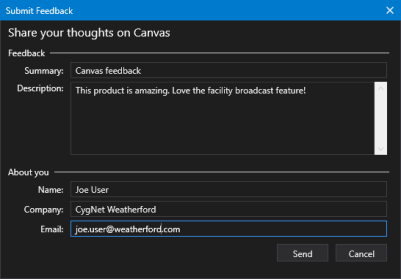
Use these methods to let us know about your experience using the Canvas application. We appreciate your input!
Note: If none of the listed methods of feedback suit your needs, we still want to hear your thoughts. To help Canvas be as responsive as possible to your needs, you are also welcome to email feedback to:
- CygNet Support: CygNetSupport@weatherford.com
Feedback Prompts
As an experienced CygNet user, you are in a unique position to offer informed feedback about this product, and to influence its future evolution to support your needs. All feedback will be considered, digested, and put to good use as we continue to test, refine, and develop the application.
The following table lists some areas of interest and some sample questions you might ask yourself to help generate responses about how you use, or would like to use, the Canvas application more effectively.
| Comments | Questions |
|---|---|
|
Appearance |
|
|
Usability |
|
|
Features |
|
|
If only… |
|
Feedback Submission Failure
If the feedback submission fails, for whatever reason, you will be presented with an error message notifying you that the feedback message will be saved locally in the CygNet\Bin\CanvasFeedback folder:
|
Submit feedback failure message |



