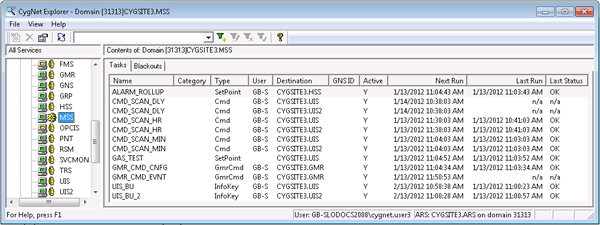
The Master Scheduling Service (MSS) is the CygNet scheduler. It can be used to schedule UIS command tasks, FMS command tasks, set info keyword tasks, and setpoint tasks. Tasks can be scheduled to be recurring, for a duration, based on a condition, or continuous. A task can be applied to a single device or multiple devices. Blackout periods can be applied to tasks.
The MSS enables you to automate the routine execution of typical and atypical tasks under certain defined conditions. Conditions include time conditions, like specific dates, intervals, and durations, setpoint conditions where task execution occurs upon a specific value being reached in a current value service (CVS), and other conditions. You may also schedule blackouts, which are periods of time during which routine task execution for a specific task is stopped. Tasks and blackouts can be used in conjunction to fine-tune automated task execution. Although task configurations are ideally standardized across a system, a single task can sometimes be scheduled in different ways.
|
|
| Sample MSS Pane |
Typical uses of the MSS include the following:
Tasks are scheduled by means of the MSS pane Tasks and Blackouts pages, and by using the MSS Viewer utility.
To address questions or circumstances beyond the scope of the CygNet Help, Additional CygNet Resources are available.
More:
|
|
|


