Report Module Workflow
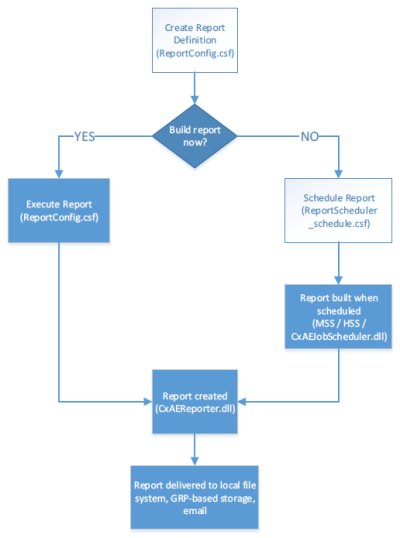
The diagram at the right shows the workflow required to define a report, build the report, execute or schedule the report, create the report, and deliver the report. The steps required to produce a report are listed below.
Step 1: Create a Report Definition FileThe details of a report are defined in an XML-based Report Definition File (.rdf). These files contain the definition of the reports:
Report Definition Files are created by the ReportConfig.csf CygNet Studio screen that is provided as part of the Report Module installation. For more details on the user interface for creating new Report Definition Files, see Configuring Reports. Step 2: Execute the ReportReports can either be run manually or scheduled the run at a later point in time. To run a report manually, open ReportConfig.csf CygNet Studio screen and select the report to be run from the list on the left. Then click the Execute button. You will see the report running in the grid on the right. When it is completed, you will see its status set to Complete. At this point, the report is finished processing and will be delivered by whatever means were defined in the Report Definition file. Step 2a: Schedule the ReportA report can also be scheduled to run later. This can be configured through ReportScheduler_schedule.csf. First you must create a schedule and define how often it should recur (daily, monthly, every other week, etc.). Then you must associate Report Definitions with that schedule. This will cause those reports to be run on the interval defined for the schedule. For more information, see Configuring a Report Module Schedule. Step 3: Deliver the ReportReport delivery is configured as part of the Report Definition File. See Configuring Reports — Storage. |
|