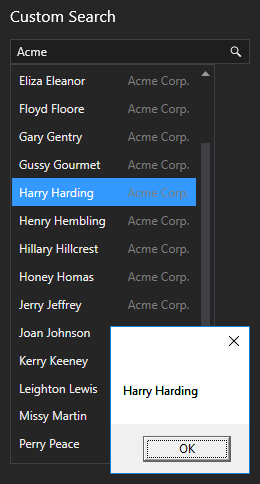
Custom searching is supported via script to allow you to query whatever you want, for example, a SQL database, a .csv file, even a web site. When a full or partial search term is entered in the search box, a custom script method is fired to search a specified item or object, and any matching terms are returned in a search results list. Further custom actions can be executed when selecting a search result.
- Add a search box to your screen.
- Configure the following properties in the Properties pane:
- Include in script —
The Include in script check box indicates that the control will appear in the objects collection of the screen (if scripting is enabled). To optimize performance, best practice dictates that you only include the controls you need to manipulate via script. Other controls should be excluded. When you add an event to a control, it will be automatically added to script and the Include in script property (and the In Script check box on the Controls view) will be set to True.
Click to enable.Tip: You can also change the Include in Script setting on the Controls view of the Screen pane.
- Enabled — Click to enable. The Enabled check box indicates whether the control is enabled. The default value is True.
- Search custom — Click to enable.
The Search custom check box indicates whether a custom search will be performed.
This property invokes the CustomSearch script property, a delegate that references a custom search method, when a user searches for a string.
Example
private void Search2_Initialize(object sender, EventArgs args)
{
Objects.Search2.CustomSearch = DoCustomSearch;
ParseCsvFile(@"C:\Temp\List.csv");
}
See Scripting Custom Searches for more information about this property.
- Selection action — Select the Script option. Executes a script event when selecting a facility or custom item from the search results. If you are setting up a facility search, and want to script the selection action, you also need to enable the Search facilities check box. If you are setting up a custom search to query some other object, for example, a SQL database, a .csv file, even a web site, you also need to enable the Search custom check box. See Scripting Custom Searches for more information.
- On the Events pane enable the Initialize and SearchResultSelected events.
- On the Script view write appropriate script to define the custom search method, perform the custom search, return the search results or error message, format the search results, and fire an event for the selected search result. See the script example sample code below.
- Configure any other search box properties.
- Save the screen.
- Run the screen to test your configuration.
|
A search box scripted to search a .csv file. |