
Alarm box examples
These attributes specify the text that will appear in the three items in the alarm box on the notifier. The text can be a static label or dynamic text based on point or facility attributes. Dynamic text is built using tokens, which can represent real-time CVS point properties, point configuration properties, and facility properties. Each alarm box will expand in width to display any specified text.
|
Alarm box examples |
These settings are saved in XML format as part of the global settings file (.gsf) for your Canvas application and applied to all instances of Canvas.
 to configure the text strings using the CygNet Property String dialog box.
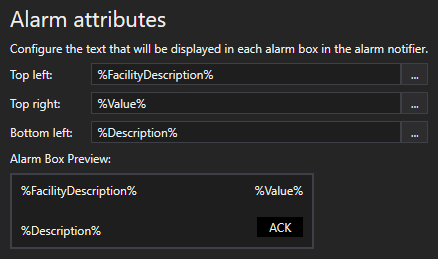
Alarm attributes configuration
The default tokens for the three items are facility description (%FacilityDescription%), point value (%Value%), and point description (%Description%); but you can define any desired static text or tokens.
The contents of the alarm box will be previewed in the box below the configuration items.
The top left item in the alarm box will link to a screen of your choice for the associated facility. The navigation mode is determined by the Navigation by Facility feature.
Perform the following steps to configure the facility attribute name, the path to the associated screen in the facility attribute, and the facility navigation mode:
|
|
|

